Know what’s on your site before a plaintiff’s firm does
A free privacy audit shows which cookies, pixels and trackers are running — and which ones commonly appear in privacy claims.
A spreadsheet listing your software is not enough to explain what happens to personal information. A useful data inventory connects each business purpose to the people, records, systems and organizations involved—and a data map shows the journeys between them. The real test is whether someone can verify those connections.
This implementation workbook helps privacy, security and business teams build that evidence together. Start with one important workflow, prove where its data travels, then expand. The tables, interview prompts and acceptance tests below turn a documentation exercise into an operational control.
For the broader program framework and asset-record template, read our comprehensive guide for privacy professionals.
TL;DR
- Inventory processing activities, not just applications; connect purposes, owners, data categories, recipients and retention rules.
- Combine interviews with technical discovery, then verify each important data flow using evidence rather than assumptions.
- Assign accountable owners and change triggers so the inventory supports rights requests, incident response and ongoing governance.
Data inventory, data map and RoPA: three connected views
A data inventory is a structured record of personal information and the activities involving it. A data map describes how that information moves from collection through use, disclosure, storage and disposal. Neither has to be a picture: a flow table can be more useful than an elaborate diagram.
A record of processing activities (RoPA) is a regulatory record with prescribed content under GDPR Article 30. An inventory can supply its inputs, but a system list or flowchart does not automatically satisfy those requirements. See the separate explanations of what a RoPA contains and data mapping for foundational concepts.
Use stable identifiers: an activity ID for “customer onboarding,” a system ID for the CRM, and a flow ID for each transfer. One application can serve several activities; one activity can involve several applications. Linking these records avoids contradictory copies.
Why the inventory matters beyond documentation
GDPR Article 30 distinguishes controller and processor records. Controller records cover identity and contact details, purposes, categories of people and data, recipients, relevant international transfers, and, where possible, erasure time limits and a general description of safeguards. Processor records have different requirements. The exemption for organizations with fewer than 250 employees is conditional, not a blanket small-business exception.
California does not simply require every covered business to maintain an Article 30-style register. However, the CCPA as amended by CPRA requires operational knowledge to support notices, rights and retention decisions. CPPA regulations, including section 7002, restrict collection, use, retention and sharing to reasonably necessary and proportionate purposes.
State requirements differ. For example, Minnesota section 325M.18(a)(2)(iii) expressly includes maintaining an inventory in its security-practice obligations for covered controllers. Do not assume all state laws use identical definitions, exemptions or consent rules.
- Privacy notices and rights: reconcile actual collection with disclosures and route access, correction, deletion and opt-out requests.
- Security and breach response: identify sensitive repositories, access paths, affected categories and downstream recipients; corroborate incident scope with logs.
- Vendor oversight: connect disclosures to contracts, subprocessors and deletion commitments.
- Minimization and AI governance: challenge unnecessary fields and trace prompts, training datasets, retrieved documents, outputs and model-provider logging.
An inventory informs these decisions; it does not establish a lawful basis, prove security effectiveness or replace a required risk assessment.
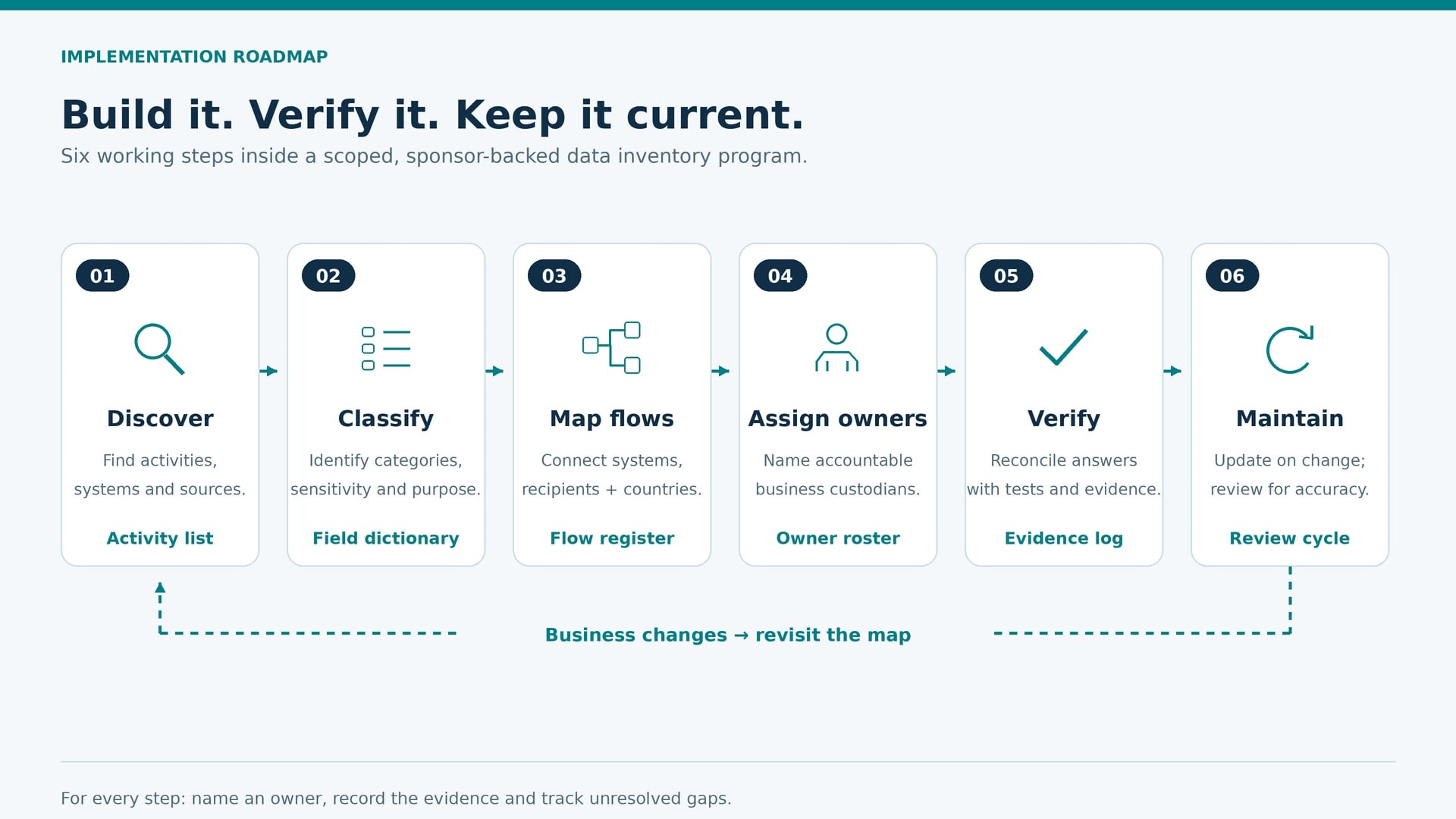
The implementation roadmap: define an exit test for every phase
Phase 1: Sponsor and scope the work
Owner: executive sponsor with the privacy lead. Define entities, jurisdictions, business functions and personal-data categories in scope. Include workers, applicants, customers, visitors and business contacts. Identify paper forms, phone calls, events, mobile apps and connected devices—not only websites.
Prioritize high-volume or sensitive activities in HR, finance, sales, marketing and customer support. Operations should include account creation, orders and supply chains; IT should include asset management, cloud services, backups, continuity and disaster recovery. Ask department leaders to nominate privacy champions who can surface changes between reviews.
Make the scope concrete: HR covers recruitment, onboarding, payroll, benefits, leave and retirement records. Finance covers supplier payments, customer invoices and debt collection. Marketing and sales cover email campaigns, targeted advertising, analytics and prospect management. Product teams include new service launches as well as existing accounts and orders. These are starting examples, not a complete organizational checklist.
Exit test: an approved scope, a known backlog of exclusions and named owners. Leadership should allocate interview time and resolve nonresponses, not merely endorse the project.
Phase 2: Discover activities and collection points
Owner: business process owners supported by IT. Seed the register from procurement, single sign-on, contracts, architecture records, accounts payable and existing assessments. Walk through real work: a lead becomes a customer, an applicant becomes an employee, or a support ticket becomes an analytics export.
List every collection route and onward copy. Include shared drives, spreadsheets, email attachments, test environments, archives and employee-selected tools. Ask what happens during exceptions, such as payment disputes or an outage. These workarounds often reveal missing repositories.
Exit test: each prioritized activity has documented sources, systems, people affected and an owner; unknowns become tracked tasks.
Phase 3: Map and reconcile the evidence
Owner: IT/system owners with privacy and procurement. Connect activities to flows, recipients, storage regions and retention rules. Compare interview answers against configuration, contracts, logs and appropriately scoped scans. Record the verification date and confidence level.
Exit test: every critical flow has a source, destination, data category, purpose and evidence reference. A missing answer is marked “unverified,” with an assignee and due date—not guessed.
Phase 4: Test, remediate and hand over
Owner: privacy program owner with operational teams. Run a rights-request walkthrough, a deletion test and an incident tabletop against the map. Compare privacy notices with observed behavior. Assign fixes for excess collection, unsupported transfers, broad access and unexplained retention.
Exit test: owners attest to their records, priority gaps have action plans, and change-management workflows require inventory updates. Attestation confirms reviewed facts, not universal compliance.
Who owns what? A practical RACI
R means responsible for doing the work; A means accountable for the outcome; C means consulted; I means informed. This example assigns one accountable role per decision. Adapt it to your organization while preserving the DPO’s advisory and monitoring independence where relevant.
| Task | A | R | C | I |
|---|---|---|---|---|
| Approve scope and resources | Executive sponsor | Privacy lead | Department heads | System owners |
| Describe purposes and data use | Business process owner | Department champion | Privacy, IT | Security |
| Verify systems and flows | IT service owner | Engineers | Security, business owner | Privacy |
| Confirm vendor disclosures | Vendor relationship owner | Procurement | Legal, security, privacy | IT |
| Approve retention rules | Records governance owner | Records team | Legal, business owners | IT implementers |
| Coordinate reviews and gaps | Privacy program owner | Inventory coordinator | All record owners | Executive sponsor |
What fields should a data inventory capture?
Use this field dictionary to build linked worksheets or configure a platform. These are recommended operational fields, not a claim that every law mandates every column. Store categories and evidence references rather than copying personal records into the inventory.
| Field | What to record | Example or verification |
|---|---|---|
| Activity ID and purpose | Stable identifier and specific outcome | ACT-01: fulfill customer orders |
| Entity and privacy role | Relevant legal entity; controller/processor or applicable state-law role | Confirm actual activity and contract |
| Owner and contact role | Business approver and technical custodian | Commerce operations; CRM administrator |
| People affected | Categories of individuals, including vulnerable groups | Customers; flag known children’s data |
| Data categories and sensitivity | Identifiers, transactions, inferred profiles; applicable sensitive categories | Email, delivery address; classification rules |
| Source and collection channel | Direct, purchased, observed or inferred; online/offline entry point | Checkout form; telephone order |
| Processing operations | How information is used and whether purposes change | Validate address; dispatch order |
| Lawful basis and permissions | Applicable legal basis, sensitive-data condition, consent or preference evidence | Link legal analysis and consent records |
| Systems and copies | Primary store, exports, logs, backups and test copies | System IDs and repository references |
| Access and safeguards | Roles, permissions and general technical/organizational controls | Access review; encryption configuration |
| Recipients and relationships | Processors, third parties, affiliates and onward providers | Vendor ID; DPA; subprocessor list |
| Locations and transfers | Storage/access countries; transfer route and applicable mechanism | Region settings; transfer assessment reference |
| Retention and disposal | Trigger, duration/criteria, justification, holds and deletion method | Approved schedule; deletion-job evidence |
| Rights handling | Search keys, request owner, deletion limits and recipient notification route | Customer ID; tested runbook |
| Advertising and AI flags | Potential sale/sharing, targeted advertising, profiling, training or inference | Document assessment, not assumed classification |
| Verification and change history | Evidence, reviewer, date, confidence, next review and open issues | Ticket reference; verified/partial/unverified |
Discovery works best when conversations meet technical checks
Surveys collect consistent answers efficiently, but ambiguous responses need follow-up. Interviews uncover why teams use information and where unofficial copies go. Automated discovery can identify likely personal data in connected repositories; it cannot reliably infer every business purpose, legal role or justified retention period.
Use the business-process interview playbook for department coverage and a longer sequence of discovery questions.
Before scanning, approve scope and access, use least privilege, protect scan results and test classification accuracy. Record inaccessible locations and sampling limits. Never present a successful scan as proof that no undiscovered data exists.
For website collection, a tool such as Patrol can contribute observations about website tracking. Browser observations still need reconciliation with server-side integrations, contracts and internal repositories.
Seven prompts for a useful process interview
- Show the first point where information about a person enters this workflow.
- Which fields are essential, which are optional, and which are inferred later?
- What permits this use, and where are any required consent or preference records?
- Who can view, export or change the records, including temporary staff?
- Which vendors, affiliates or independent organizations receive a copy, and why?
- Where do exports, backups and exceptions go; what starts the deletion clock?
- Show how an access, correction, deletion or opt-out instruction reaches every relevant destination.
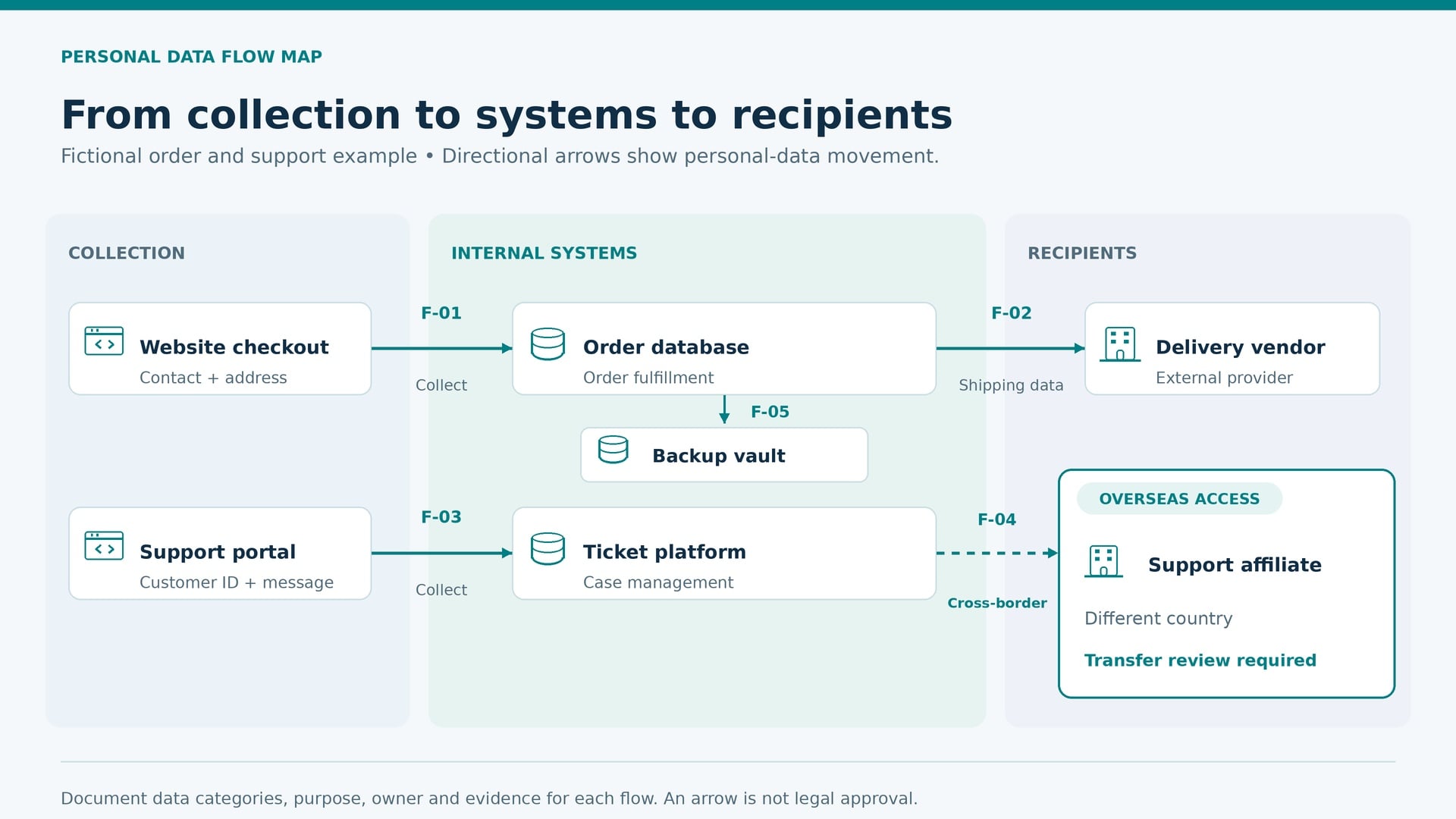
Turn the inventory into a verifiable data map
Draw systems as nodes and movements as directional connections, or use the table below. Label each connection with a flow ID. Keep the readable overview separate from restricted technical evidence. This fictional example illustrates documentation—not a recommended architecture or an approved transfer arrangement.
| Flow | Source → destination | Data and purpose | Owner | Evidence / unresolved issue |
|---|---|---|---|---|
| F-01 | Checkout → order database | Contact/address; fulfill purchase | Commerce | Form schema and API configuration |
| F-02 | Order database → delivery vendor | Address/order reference; delivery | Logistics | Contract and payload sample; verify onward recipients |
| F-03 | Support portal → ticket platform | Customer ID/message; resolve issue | Support | Integration log; attachments need classification |
| F-04 | Ticket platform → overseas support affiliate | Ticket content; case assistance | Support operations | Access-country review and transfer analysis pending |
| F-05 | Order database → backup vault | Replicated records; recovery | IT operations | Backup policy; expiry and restore controls to test |
For third parties, distinguish a service provider from an independent recipient based on facts and applicable law, not the vendor’s label. Connect each recipient to due diligence, restrictions on reuse, subprocessors and termination procedures. Use the vendor risk management framework to prioritize reviews.
For international flows, capture origin, destination, hosting region and remote-access countries. Privacy/legal should assess applicable transfer requirements and document the mechanism and supporting assessment where needed. A vendor headquarters address or a contract promising “regional hosting” does not resolve every access route.
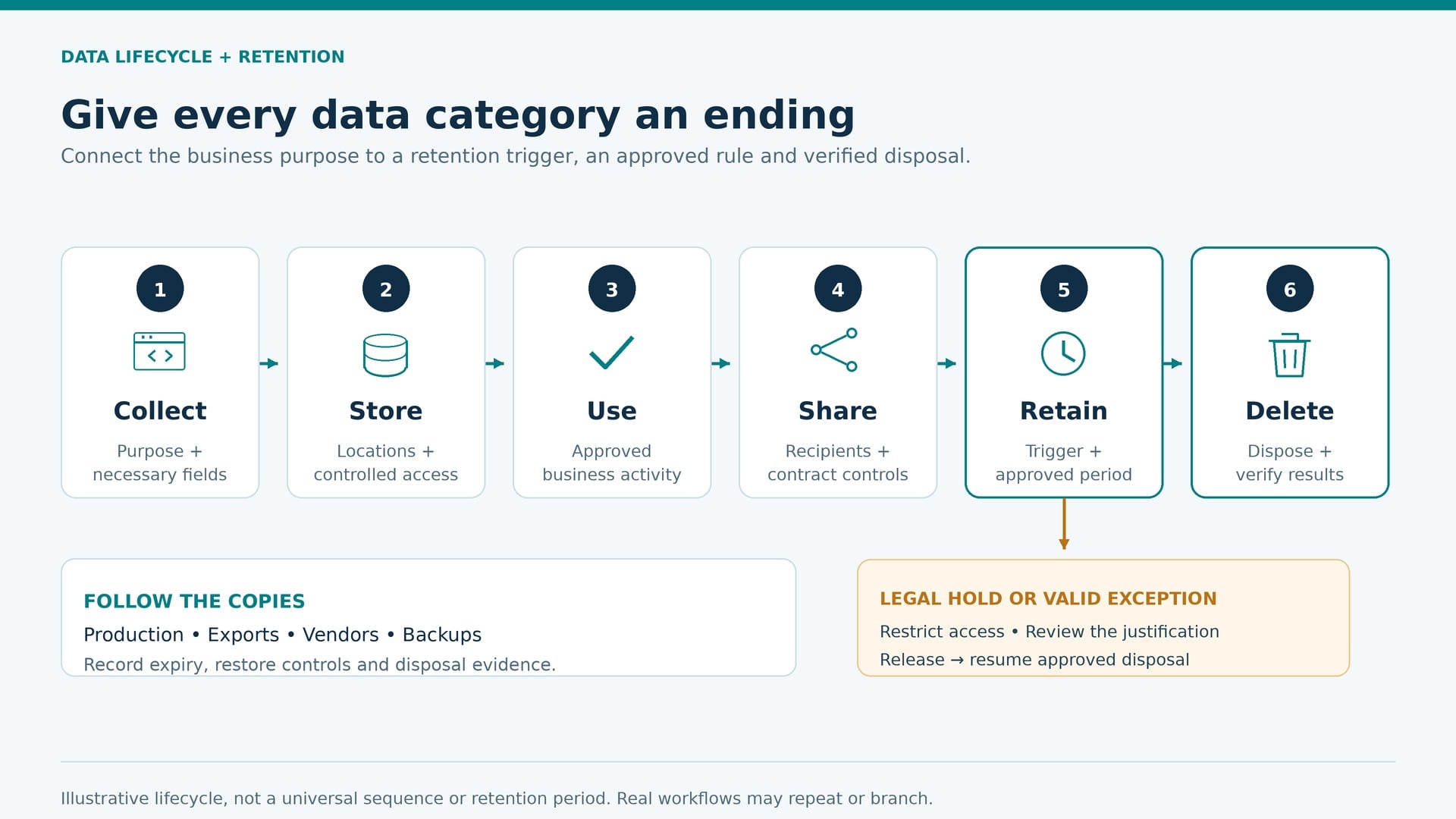
Retention must describe an executable ending
“Keep as needed” is not an operational instruction. Tie each rule to a category and purpose, a starting event, a duration or objective criteria, and a documented justification. Different copies may require different schedules; avoid inventing one universal retention period.
Identify legal holds and other valid exceptions, who authorizes them, and how release restarts disposal. Document deletion, destruction or effective anonymization across production, exports and vendors. Pseudonymization alone does not necessarily remove information from privacy-law scope.
Backups need their own expiry and restore controls. Record whether selective deletion is possible and how restored data is prevented from reintroducing records that should remain deleted. Keep test evidence without retaining unnecessary personal information.
Make the map earn its place: three acceptance tests
- Rights test: use a controlled test identity to locate records and route a request across relevant systems and recipients. Compare the result with the DSAR response workflow. Record gaps rather than promising automatic completion.
- Incident test: choose a compromised system and identify affected activities, categories, owners and recipients. Validate the map against incident evidence; let counsel assess notification duties.
- Disposal test: follow an approved expiry event through the primary system, exports and vendor instructions. Verify outcomes instead of relying only on a configured policy.
A 30/60/90-day plan with measurable outputs
These are planning milestones, not statutory deadlines or a promise to finish every enterprise in three months.
| Window | Deliverable | Evidence of progress |
|---|---|---|
| Days 1–30 | Approved scope, owner roster, field dictionary and one pilot workflow | Sponsor sign-off; pilot interview reconciled with system evidence |
| Days 31–60 | Priority activities, linked flows and recipient/retention gap log | Report verified critical flows divided by all identified critical flows |
| Days 61–90 | Test results, remediation ownership and maintenance handover | Rights/incident/disposal exercises completed; overdue issues escalated |
Keep it current—and measure maturity honestly
Trigger updates before new products, vendors, collection fields, purposes, AI uses or hosting locations launch. Include acquisitions, website tag changes, changed laws and retired systems. Feed privacy risk assessments and procurement reviews into the same record rather than creating disconnected inventories.
Use a risk-based review cadence: for example, quarterly checks for high-change activities and an annual program-wide owner attestation, alongside event-driven updates. These are suggested governance intervals, not a universal legal schedule. Track owner coverage, stale records, unresolved transfers and deletion tests, with clear denominators.
- Level 1—Listed: assets are recorded, but purposes or owners remain unclear.
- Level 2—Connected: activities, systems, recipients and retention rules are linked.
- Level 3—Verified: critical connections have dated evidence and tested response routes.
- Level 4—Embedded: business changes trigger updates and recurring tests expose drift.
This is a self-assessment model, not a certification. A polished dashboard cannot compensate for unverified critical flows.
Common mistakes that undermine the work
- Starting with every database: pilot an important process first, then reconcile broader discovery.
- Treating answers as facts: retain evidence and explicitly track uncertainty.
- Ignoring manual copies: include exports, paper, inboxes and employee workarounds.
- Assigning everything to privacy: make business owners accountable for actual practices.
- Confusing observation with legal approval: a discovered tracker or vendor relationship still needs assessment.
- Collecting excessive evidence: avoid building a new sensitive-data repository inside the inventory.
Print-and-save implementation checklist
Copy this checklist into your project tracker or use your browser’s Print → Save as PDF. It is an on-page working checklist, not a separate downloadable file.
- ☐ Sponsor, scope, priority workflows and exclusions approved.
- ☐ Business owners and technical custodians assigned.
- ☐ Online, offline, observed and inferred collection covered.
- ☐ Purposes, data categories, permissions and access documented.
- ☐ Systems, manual copies, backups and AI uses reconciled.
- ☐ Flow IDs linked to recipients, affiliates and subprocessors.
- ☐ Countries and applicable transfer documentation checked.
- ☐ Retention triggers, exceptions and disposal methods approved.
- ☐ Notices compared with verified practices.
- ☐ Rights, incident and deletion routes tested.
- ☐ Evidence dates, confidence and remediation tasks recorded.
- ☐ Change triggers and recurring owner reviews operating.
Frequently asked questions
What should count as one inventory entry?
Start with a distinct processing purpose, then link systems and flows. Split entries when purposes, recipients, legal roles or retention rules differ enough that a combined record would hide meaningful decisions.
Can a spreadsheet support the first version?
Yes. Use controlled access, stable IDs, validation lists and version history. Consider a platform when relationships, evidence collection and owner reminders become difficult to manage reliably—not simply because the spreadsheet has many rows.
How do we record a vendor flow we cannot yet confirm?
Mark it unverified, explain the missing evidence and assign a follow-up owner. Escalate high-risk uncertainty. Do not silently convert an assumption about hosting, reuse or deletion into a verified fact.
Do AI prompts and generated outputs belong in scope?
Include them when they contain or relate to personal information. Map provider logging, retention, training permissions and onward access. Also consider retrieval stores and embeddings that may remain linked to identifiable people.
When is the first inventory good enough to use?
When priority activities have owners, material connections are evidenced, limitations are visible and response routes have been tested. Begin using that scoped version while expanding coverage; never describe partial coverage as complete.
This guide provides general education, not legal advice. Apply requirements to your organization’s roles, jurisdictions and processing activities with qualified counsel.
Put this into practice
Turn privacy guidance into working controls.
Captain Compliance helps teams discover tracking technologies, enforce consent, manage privacy requests and document the evidence behind every decision.