Know what’s on your site before a plaintiff’s firm does
A free privacy audit shows which cookies, pixels and trackers are running — and which ones commonly appear in privacy claims.
If you asked a typical business leader what personal data their company collects, you’d probably get an answer somewhere between “the usual stuff” and a slightly panicked stare.
That answer — vague, incomplete, and optimistic — is a compliance liability. And as privacy law proliferates across the United States and the world, it is becoming an expensive one.
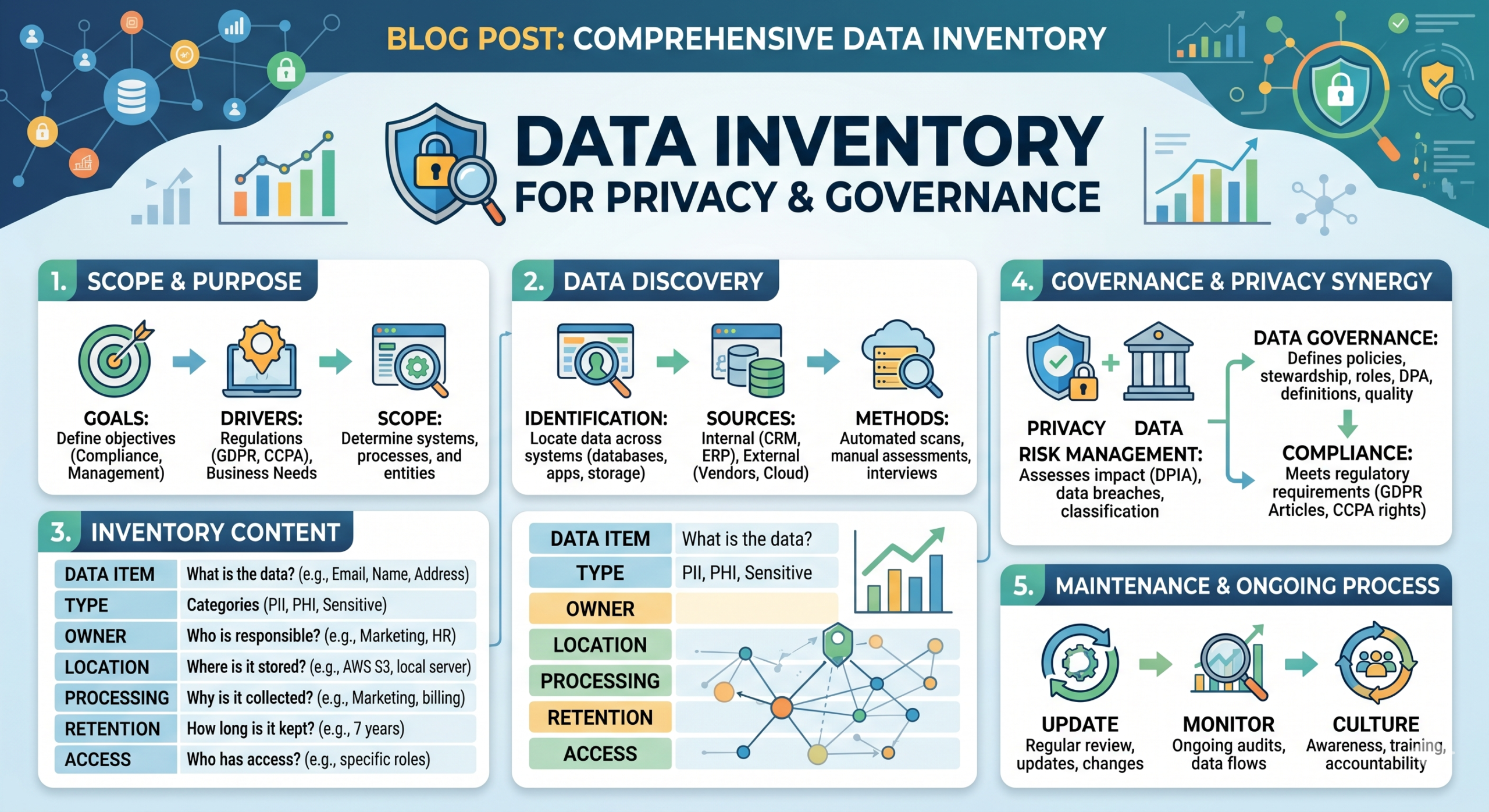
A data inventory changes that. It turns “we think we know” into “here is exactly what we hold, why we hold it, who has it, and what our legal basis is.” Done properly, it is the single most useful compliance document your organization can produce. Done poorly — or not at all — it becomes an obstacle at precisely the wrong moment: during a regulator inquiry, a consumer rights request, or a data breach investigation.
This guide gives you the complete playbook: what a data inventory actually is, why the systems-first instinct leads you astray, how to run the interviews that surface what a technical scan misses, what your template must contain to satisfy every major privacy framework in 2026, and how to build a maintenance cadence that doesn’t collapse under its own weight.
What a Data Inventory Actually Is (and Isn’t)
A data inventory — also called a data map, a record of processing activities (ROPA), or a data register — is a structured documentation of everything your organization does with personal information. That means every category of data you collect, every purpose for which you use it, every system that holds it, every third party that receives it, and every legal basis that justifies the processing.
What it is not:
- A list of your software applications
- An IT asset register
- A privacy policy
- A one-time compliance project
- Something your IT department can produce alone
The distinction matters. Regulators under GDPR, CCPA, the Minnesota Consumer Data Privacy Act (MNCDPA), and a growing list of other frameworks are not asking “what software do you use?” They are asking “what do you do with people’s data, and why are you allowed to do it?”
Those are business and legal questions, not technical ones. And that means a data inventory is — fundamentally — a business process exercise.
Why Starting With Systems Leaves You Exposed
The instinct when beginning a data inventory is to pull an application list. Run a network scan. Query the IT environment. It feels rigorous. It feels thorough.
But it answers the wrong question.
Here is what a systems-first approach reliably misses:
Personal data that lives outside formal systems. Spreadsheets maintained by individual employees. Paper intake forms at a front desk. Business card collections. Contact lists in a sales rep’s personal email. A job applicant’s resume saved to a local drive. None of these appear in an IT audit. All of them are in scope for privacy law.
Cross-functional data flows. The fact that HR data gets uploaded to a payroll processor, which shares summary data with a benefits broker, which sends enrollment confirmations back to employees — that chain of processing only becomes visible when you talk to the people doing the work.
The purpose and legal basis for processing. A system can tell you that a database contains email addresses. It cannot tell you whether those email addresses were collected for transactional communications, marketing, or both — and whether each use has a legal basis under the frameworks that apply.
What data is actually used for. Systems store data long after the original business purpose has ended. An IT scan will show you the data exists. It will not tell you that the use case for it ended two years ago and there is no legal basis to keep it.
The difference between a controller and a processor. Your organization might be the data controller for some processing activities (you determine the purpose) and a processor for others (you’re acting on behalf of a client). That distinction carries enormous legal implications. It doesn’t show up in a system scan.
The bottom line: A technical scan gives you a useful partial picture. A process-driven inventory gives you the complete one. You need both, but the process side is where the substance lives.
The Business Process Interview Method: How to Find the Data You Didn’t Know You Had
The most effective way to build a data inventory is through structured interviews with department leads — conducted not as a data interrogation, but as a conversation about how each function actually does its work.
Why Conversations Outperform Questionnaires
A questionnaire asking “what personal data does your department collect?” produces a narrow, defensive answer. People list the obvious things. They don’t mention the workarounds. They don’t volunteer the edge cases.
An open conversation that starts with “walk me through what your team does when a new customer comes in” produces a full process walk-through — and in that walk-through, every data collection point, every handoff, every system, and every exception surfaces naturally.
Which Departments to Cover
Cover every function. Every one. Privacy risk does not limit itself to marketing and HR.
| Department | Key Data Risk Areas |
|---|---|
| Human Resources | Employee records, applicant tracking, health/benefits data, background checks, disciplinary files |
| Marketing | Lead gen forms, email marketing, advertising pixels, analytics, loyalty programs, behavioral tracking |
| Sales | CRM data, prospect data sourcing, data broker use, call recordings |
| Customer Service | Support tickets, chat logs, voice recordings, identity verification |
| Finance | Payment data, invoicing, expense reimbursements, payroll |
| IT | System access logs, device management, security monitoring, vendor access |
| Operations | Physical security footage, facility access logs, delivery/logistics data |
| Legal | Legal hold data, litigation-related communications, regulatory filings |
| Product/Engineering | In-app data collection, user behavior analytics, A/B testing, third-party SDKs |
The Interview Question Stack
Use this sequence to structure each department conversation:
Opening: “Tell me what your team is responsible for, and walk me through a typical week.”
Data collection: “When does personal information first come into your team? What does that look like — a form, a system, an email, a phone call?”
Data use: “Once you have that information, what do you do with it? Who else uses it inside the company?”
Third parties: “Does any of that information go outside the company? To vendors, platforms, analytics tools, service providers?”
Retention: “How long do you keep data? Is there a formal process for deleting it, or does it just accumulate?”
Edge cases: “Are there things your team handles only a few times a year, or processes that are a bit informal? Anything that’s a manual workaround for a system that doesn’t quite fit?”
That last question is the one that matters most. Informal processes, legacy workarounds, and infrequent activities are exactly where the highest-risk undocumented processing lives.
After the Interviews
Group what you’ve discovered into discrete processing activities — one record per activity, at a level of specificity that is meaningful without being unmanageable. “Customer email marketing” is a processing activity. “All email” is too broad. Individual campaign sends are too granular.
Building a Template That Satisfies GDPR, CCPA, and Every Major U.S. State Law Simultaneously
Your template is the backbone of the entire program. Build it right once and you satisfy multiple frameworks simultaneously. Build it too narrow and you’ll be retrofitting it every time a new law takes effect.
Here is the complete field set, organized by purpose:
Core Fields (Required by Every Framework)
| Field | Description |
|---|---|
| Activity Name | Short, descriptive label (e.g., “Employee Onboarding — Background Screening”) |
| Business Purpose | Why this processing occurs and what business need it serves |
| Data Subjects | Whose data is involved (employees, customers, website visitors, job applicants, etc.) |
| Data Categories | What types of personal information are involved |
| Sensitive Data Flag | Yes/No: does this activity involve sensitive personal information? |
| Data Source | Where the data comes from (directly from the individual, a third party, inference, etc.) |
| Systems Involved | Which applications, databases, or physical locations hold this data |
| Internal Recipients | Which internal teams or roles access the data |
| Third-Party Recipients | External organizations that receive the data |
| Recipient Classification | Service provider, contractor, or third party (critical for CCPA) |
| Data Transfers | Is data transferred internationally? To which countries? |
| Transfer Mechanism | For cross-border transfers: Standard Contractual Clauses, Adequacy Decision, etc. |
| Retention Period | How long is data kept? What triggers deletion? |
| Security Measures | What controls protect this data? |
| Data Owner | The internal person responsible for this processing activity |
| Last Reviewed | Date of last review |
GDPR-Specific Fields
| Field | Description |
|---|---|
| Lawful Basis (Article 6) | Consent, Contract, Legal Obligation, Vital Interests, Public Task, or Legitimate Interest |
| Legitimate Interest Assessment | If LI is the basis: documented balancing test |
| Special Category Basis (Article 9) | If sensitive data: which Article 9 condition applies |
| Joint Controller Details | If another organization co-determines processing purposes |
| DPO Consulted | For high-risk activities: was the Data Protection Officer involved? |
CCPA/U.S. State Law Fields
| Field | Description |
|---|---|
| Sale of Personal Information | Does this activity constitute a “sale” under CCPA’s broad definition? |
| Sharing for Cross-Context Advertising | Does this activity involve “sharing” as defined by CPRA? |
| Sensitive Personal Information (SPI) | Does this activity involve CCPA-defined SPI? |
| Consumer Rights Impact | Which consumer rights does this activity implicate? |
| Opt-Out Mechanism | If sale/sharing is flagged: is an opt-out mechanism in place? |
State-Law-Specific Flags
| Field | Description |
|---|---|
| High-Risk Processing Flag | Triggers PIA requirement under VCDPA, CPA, CTDPA, OCPA, etc. |
| Targeted Advertising | Does this activity support targeted advertising? |
| Profiling Flag | Does this activity involve profiling with legal or significant effects? |
| Data Minimization Documented | Is there evidence that only necessary data is collected? |
The Regulatory Checklist: What Each Framework Actually Requires
GDPR — Article 30 Records of Processing Activities (ROPA)
Who must comply: Organizations subject to GDPR (EU/EEA data subjects, or organizations with EU/EEA establishment). The Article 30 exemption for organizations with fewer than 250 employees is narrow and unreliable — most SMEs still need a ROPA.
What must be documented:
- Controller and DPO contact details
- Purposes of processing
- Categories of data subjects
- Categories of personal data
- Categories of recipients
- Third-country transfers and safeguards
- Retention periods (where possible)
- Security measures (where possible)
The critical piece most organizations get wrong: Lawful basis. Every processing activity must be mapped to an Article 6 basis. Legitimate interest requires a documented balancing test. Consent requires records of how and when consent was obtained. These are not box-checking exercises — supervisory authorities examine them closely.
Maintenance requirement: ROPA must reflect current processing. Review triggers include: new system onboarding, new vendor relationships, new processing activities, significant process changes, and annual review as a baseline.
CCPA/CPRA — California’s Privacy Framework in 2026
Who must comply: For-profit businesses that collect California residents’ personal information and meet one of three thresholds: (1) annual gross revenue over $25 million, (2) annually buy, sell, receive, or share personal information of 100,000+ consumers or households, or (3) derive 50%+ of annual revenue from selling/sharing personal information.
Inventory requirements in 2026-2027:
The California Privacy Protection Agency (CPPA) finalized cybersecurity audit regulations that took effect January 1, 2026, creating a formal data inventory obligation for in-scope businesses. This is not a best practice — it is a regulatory requirement with defined scoping thresholds and audit expectations.
Beyond the cybersecurity audit, your inventory must support:
- Privacy notice disclosures (categories collected, used, and sold/shared)
- Consumer rights request fulfillment (access, deletion, correction, portability, opt-out)
- Opt-out mechanics for sale and sharing
- Sensitive personal information use limitations
CCPA’s definition of “sale” and “sharing” is broader than most organizations assume. Sale includes any exchange of personal information for “valuable consideration” — not just cash. Sharing covers cross-context behavioral advertising even with no money changing hands. Your inventory must flag both at the processing activity level.
CCPA Sensitive Personal Information includes Social Security numbers, financial account details, precise geolocation, racial or ethnic origin, religious beliefs, union membership, personal communications, genetic and biometric data, health information, and sexual orientation or gender identity. Each SPI processing activity carries heightened disclosure and consumer rights obligations.
Minnesota MNCDPA
Minnesota is currently the only U.S. state to explicitly mandate a data inventory under the Minnesota Consumer Data Privacy Act. That makes it the clearest signal of where the broader regulatory landscape is heading. If your organization has Minnesota consumers, the inventory is not optional — it is a statutory requirement.
The Comprehensive State Law Matrix (2026-2027)
Eighteen states now have comprehensive consumer privacy laws in effect. The following table maps the key inventory-relevant obligations:
| State | Law | PIA Required For | Sensitive Data Categories | Notable Features |
|---|---|---|---|---|
| California | CCPA/CPRA | High-risk processing; cybersecurity audits | Biometric, health, financial, geolocation, race/ethnicity, religion, union, sexual orientation | Broadest “sale/sharing” definition; CPPA enforcement |
| Virginia | VCDPA | Targeted advertising, sale of PI, sensitive data, profiling | Race, religion, health, sexual orientation, citizenship, precise geolocation, biometric | Controller/processor framework |
| Colorado | CPA | Targeted advertising, sale of PI, sensitive data, profiling, minors | Similar to VCDPA | Universal opt-out mechanism requirement |
| Connecticut | CTDPA | Targeted advertising, sale of PI, sensitive data, profiling | Similar to VCDPA | |
| Oregon | OCPA | Targeted advertising, sale of PI, sensitive data, profiling | Broader definition than most states | |
| Minnesota | MNCDPA | High-risk processing | Similar to VCDPA | Explicit data inventory requirement |
| Texas | TDPSA | N/A | Similar to VCDPA | No revenue/volume threshold |
| Florida | FDBR | N/A | Similar to VCDPA | High revenue threshold ($1B) |
The practical implication: Build your template to capture the superset of requirements across all applicable states from day one. Retrofitting a narrow template every time a new law takes effect is avoidable overhead.
The Hidden Data Problem: Shadow IT, Manual Workarounds, and the Spreadsheet on Karen’s Desktop
Here is the uncomfortable truth about data inventories: the most significant compliance risks are usually not in your formal systems. They’re in the gaps.
Shadow IT — software and services adopted by individual employees or teams without formal IT approval — is endemic in modern organizations. Cloud storage services, communication platforms, project management tools, and AI assistants all process personal data, and none of them appear in your enterprise application list.
Manual workarounds emerge whenever a formal system doesn’t quite fit a business need. A customer service rep who tracks complaint resolutions in a personal Google Sheet because the CRM doesn’t have the right fields. A finance team member who downloads a report to Excel to do calculations. A manager who maintains a distribution list in Outlook for a team that doesn’t officially exist yet.
Legacy practices persist long after the business context that created them has changed. Files retained because “we might need them someday.” Backup tapes with no retention schedule. Contact databases from a trade show ten years ago.
How to find them:
- Ask directly in interviews: “Is there anything your team does that IT doesn’t know about?”
- Ask about exceptions: “What do you do when the system can’t do what you need?”
- Ask about history: “Is there anything from a few years ago — a project, a campaign, a process — that created data that’s still sitting somewhere?”
- Review file storage systems (SharePoint, Google Drive, Box) for unstructured personal data
- Conduct a network scan for unauthorized cloud services (SaaS discovery tools)
- Review email attachment patterns for data-heavy workflows
None of this is punitive. The goal is not to catch people doing something wrong — the goal is to bring undocumented processing into the inventory so it can be managed. Frame the conversations that way, and you’ll get honest answers.
Data Inventory Maintenance: Building a Living Record Without Burning Out Your Team
A data inventory that is accurate on the day it is completed and ignored thereafter is a compliance liability, not an asset. The regulator who examines your ROPA two years after you built it and finds it full of outdated information will not be impressed by how thorough your original work was.
Maintenance requires three things: ownership, triggers, and cadence.
Ownership
Every processing activity in your inventory needs a named data owner — someone who is accountable for keeping that record current and flagging changes. This is usually the department lead or a designated privacy champion within each function. Without named ownership, updates fall through the cracks.
Triggers
Define the events that automatically trigger an inventory review. These should include, at minimum:
- Onboarding a new software system or SaaS application
- Entering a new vendor relationship involving personal data
- Launching a new product, service, or marketing program
- Significant changes to an existing process
- An acquisition or divestiture
- Entry into a new market or jurisdiction
- A data breach or near-miss incident
- Receipt of a consumer rights request that reveals an undocumented data flow
Build these triggers into your procurement, vendor management, and product development processes. The best time to capture a processing activity is before it starts, not six months after.
Cadence
Beyond event-driven reviews, schedule a full inventory review at least annually. Treat it as a governance milestone, not an ad hoc task. Put it on the privacy calendar. Assign it a completion date. Review it at the board or executive level if your organization’s regulatory exposure warrants it.
A quarterly spot-check of high-risk processing activities (those involving sale/sharing, sensitive data, or children’s data) adds an additional layer of assurance without requiring a full re-inventory.
Common Data Inventory Mistakes and How to Avoid Them
Mistake 1: Treating it as a one-time project The inventory is a living record. Build the maintenance program at the same time you build the initial inventory, not as an afterthought.
Mistake 2: Assigning it entirely to IT IT can support the technical elements, but the substance of the inventory lives in business processes. Privacy, legal, and operations need to be equally involved.
Mistake 3: Over-granularity Documenting every individual field in every database makes the inventory unmaintainable. Document at the processing activity level, with data categories — not data fields.
Mistake 4: Under-granularity “All HR processing” is not a processing activity. “Employee performance review data — collection, storage, and use in promotion decisions” is.
Mistake 5: Forgetting processors and sub-processors Your inventory must capture third-party recipients — and for organizations acting as data processors for others, you need to document the processing you do on their behalf as well.
Mistake 6: Not mapping the lawful basis Especially under GDPR: documenting what you do without documenting why you’re allowed to do it is an incomplete record. Every processing activity needs a legal basis — and for legitimate interest, that means a documented balancing test.
Mistake 7: Building it in a vacuum The inventory is most valuable when it feeds other compliance processes: privacy notice drafting, privacy impact assessments, vendor due diligence, and consumer rights request response. If it’s a standalone document with no connection to anything else, its value is limited.
Mistake 8: Assuming current = complete Even if every known system is documented, the inventory is not complete until you’ve actively hunted for the undocumented processing that doesn’t appear in any system list.
When to Use a Spreadsheet vs. a Data Mapping Platform
This question comes up in almost every data inventory project. The honest answer: it depends on where you are in your compliance maturity, not on what any vendor tells you.
Start with a spreadsheet if:
- This is your first data inventory
- You have fewer than 500 employees or a limited number of processing activities
- Your team does not have experience maintaining a dedicated compliance platform
- Your budget is constrained
- You need to move quickly
A well-structured spreadsheet, consistently maintained, is more valuable than a sophisticated platform with incomplete or stale data. Get the process right first.
Recommended spreadsheet structure:
- One tab per functional area (HR, Marketing, IT, Operations, etc.)
- One row per processing activity
- Consistent columns aligned to the full template above
- A change log tab to document updates and their dates
- A status dashboard to track completion and review dates
Graduate to a dedicated platform when:
- Your inventory contains more processing activities than a spreadsheet can manage legibly
- You need audit trail functionality for regulatory evidence
- Multiple people need to update the inventory simultaneously
- You need automated review reminders and workflow
- You are managing inventories across multiple legal entities or jurisdictions
- You have integrated privacy impact assessments that need to link to inventory records
Questions to ask when evaluating platforms:
- Can we import our existing spreadsheet data without manual re-entry?
- Does it map to GDPR Article 30, CCPA, and the U.S. state law matrix out of the box?
- How does it handle multi-entity and multi-jurisdiction scenarios?
- What does the review workflow look like?
- How does it integrate with our existing procurement and vendor management processes?
- What does it cost per processing activity / per user / per year, and how does that scale?
The bottom line on technology: The platform does not create the inventory. The process creates the inventory. The platform helps you maintain and operationalize what your process has built.
Frequently Asked Questions
Do we need a data inventory if we’re a small business? It depends on which laws apply to your organization. Under CCPA, the thresholds that trigger compliance are based on revenue and data volumes, not headcount. Under GDPR, the 250-employee exemption to Article 30 is narrow and full of exceptions — if any of your processing carries a risk to individuals, or involves special categories of data, you likely need a ROPA regardless of size. And under Minnesota’s MNCDPA, the obligation is explicit. If you’re uncertain, assess which laws apply before deciding the inventory isn’t required.
How often should we update our data inventory? Event-driven updates whenever a new system, vendor relationship, or processing activity is introduced. Full review at least annually. Quarterly spot-checks of high-risk activities. For organizations subject to CCPA’s cybersecurity audit requirements, the audit itself has defined review timelines that set a floor.
What is the difference between a data inventory and a data flow diagram? A data inventory is a record — structured, tabular, and auditable. A data flow diagram is a visual representation of how data moves through an organization or system. They are complementary: the inventory is the authoritative record; the diagram is a communication tool. For regulatory purposes, the inventory is what matters.
Does a privacy policy replace a data inventory? No. A privacy policy is a public-facing disclosure document. A data inventory is an internal operational record that is typically more detailed, more granular, and not intended for public disclosure. Your privacy policy should be informed by and consistent with your data inventory — but they are distinct documents with distinct purposes.
Can we use AI to automate the data inventory process? AI tools can help with discovery (scanning unstructured data for personal information), categorization, and drafting. But the interview-based process discovery that surfaces informal, undocumented, and cross-functional data flows cannot be automated. AI assists the process — it does not replace the judgment calls, the conversations, or the accountability structures.
What happens if a regulator asks to see our data inventory? Under GDPR, regulators have the authority to request your ROPA as part of an investigation. Under CCPA’s cybersecurity audit requirements, audit readiness is an explicit obligation for in-scope businesses. Having an accurate, current, and well-structured inventory demonstrates that your organization takes its data responsibilities seriously. Having none — or having one that is clearly out of date — sends the opposite message, and in an enforcement context, that matters.
Data Inventory Software Company
A data inventory is not a compliance decoration. It is the operational infrastructure that makes every other privacy obligation achievable — consumer rights responses, privacy notices, impact assessments, vendor due diligence, breach response. Without it, you are making decisions about personal data management with incomplete information, which is both a legal risk and an ethical one.
The organizations that do this well don’t treat it as a project. They treat it as a program — with ownership, cadence, and a clear connection to the business decisions that create new processing activities. The first version is the hardest. After that, you’re maintaining rather than building from scratch, and the compliance dividend compounds with every year the inventory stays current.
Start with the processes. Talk to the people who do the work. Document what you find. And build the maintenance structure at the same time you build the record.
If you want help building or improving your data inventory program — from initial scoping through template design, department interviews, and regulatory gap analysis — Captain Compliance can help and we are a leading data privacy software solution to match and exceed your enterprises needs. Book a demo below to get started with Data Inventory help.
Put this into practice
Turn privacy guidance into working controls.
Captain Compliance helps teams discover tracking technologies, enforce consent, manage privacy requests and document the evidence behind every decision.