Know what’s on your site before a plaintiff’s firm does
A free privacy audit shows which cookies, pixels and trackers are running — and which ones commonly appear in privacy claims.
Mouseflow is a web analytics platform that provides behavior tracking tools designed to help website owners understand how visitors interact with their pages. Unlike traditional analytics platforms (like Google Analytics) that primarily aggregate numerical traffic metrics, Mouseflow focuses on qualitative visual data through features such as:
-
Session Replay: Renders a video-like reproduction of a visitor’s browser session, recording mouse movements, clicks, scrolls, form fills, and page navigations.
-
Website Heatmaps: Aggregates click, movement, scroll, and attention data to highlight hot spots and cold zones on a webpage.
-
Form Analytics: Identifies drop-off rates, blank field submissions, and time spent on specific form fields.
-
Friction Detection: Uses AI and automated triggers to highlight user frustration indicators, such as rage clicks, rapid scrolling, or error bounces.
By capturing DOM (Document Object Model) changes and user interactions in real time, Mouseflow enables UX designers, marketers, and product teams to pinpoint site usability issues and optimize conversion funnels.
What does the mf_user cookie do?
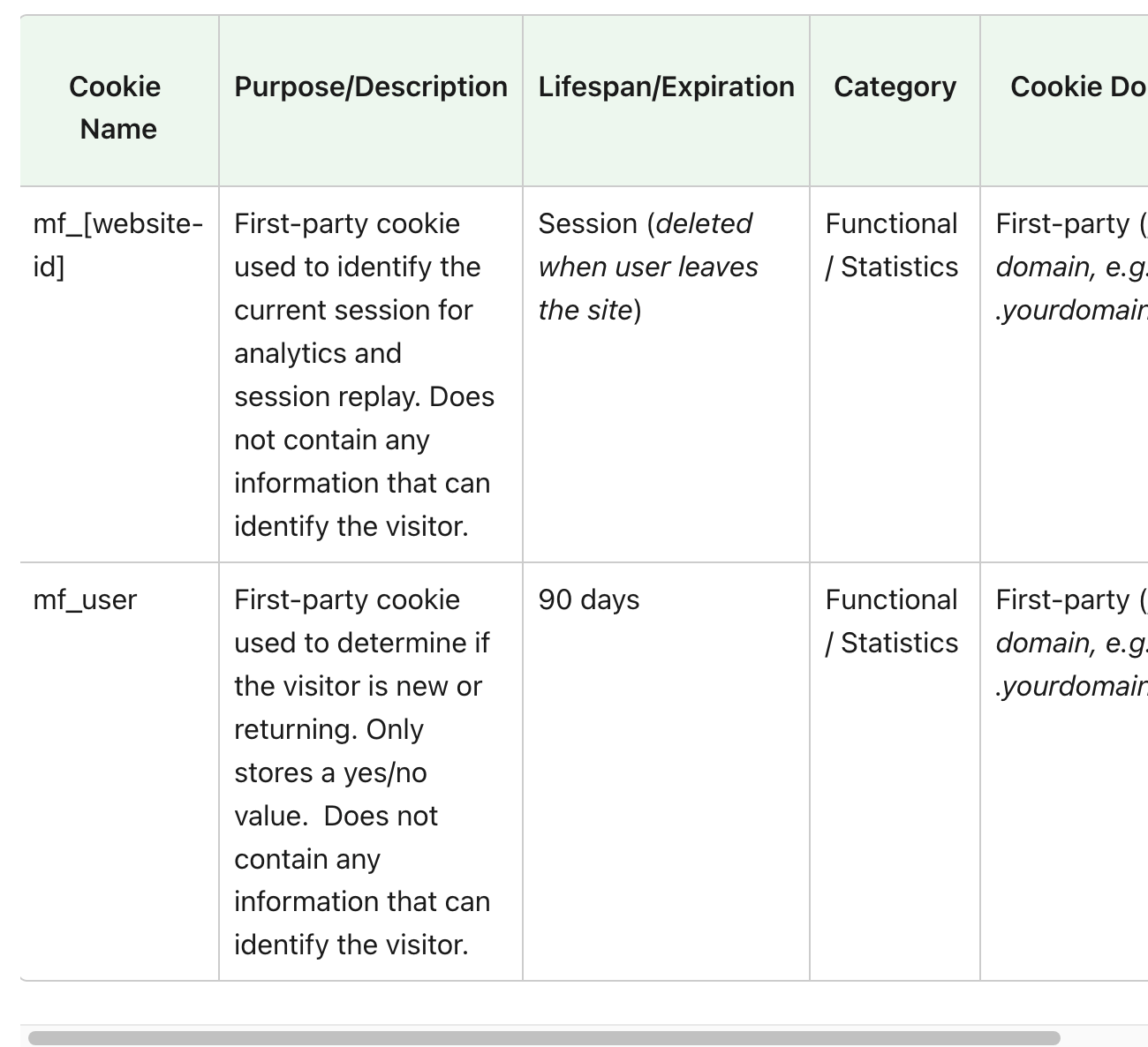
To stitch together visitor activity over time, Mouseflow sets a small text file—a cookie—in the user’s browser. One of the primary persistent cookies deployed by the platform is mf_user. As we have covered other popular session replay cookies like Hotjar and Microsoft Clarity the mf_user cookie from Mouseflow
| Property | Details |
| Cookie Name | mf_user |
| Category | Statistics / Analytics Cookie (Non-Essential) |
| Primary Purpose | Distinguishes whether a visitor is a first-time visitor or a returning user. |
| Mechanism | Stores a simple binary toggle or persistent identifier to flag returning sessions without needing to profile individual identity. |
| Lifespan | Typically set as a persistent cookie (lasting up to 90 days to 1 year depending on platform configuration). |
Because mf_user is used strictly to analyze user traffic patterns rather than provide essential site functionality (such as keeping items in a shopping cart or maintaining security sessions), privacy frameworks classify it as a non-essential performance/analytics cookie. It is not allowed to be set as strictly necessary.
mf_[website-id] Cookie from Mouseflow
Risks of Running Mouseflow Without a Cookie Consent Banner
Deploying session replay software and setting analytics cookies like mf_user without a properly functioning Cookie Consent Banner introduces significant legal, financial, and security risks. Signing up for a cookie consent banner that works from Captain Compliance can help protect against the surge in session replay privacy lawsuits.
1. Direct Breach of GDPR and the ePrivacy Directive
Under the EU ePrivacy Directive (the “Cookie Law”) and the General Data Protection Regulation (GDPR), non-essential cookies—including analytics and tracking cookies like mf_user—cannot be dropped onto a user’s device without prior, explicit, opt-in consent.
If Mouseflow initializes immediately upon page load before a visitor clicks “Accept” on a Consent Management Platform (CMP):
-
You are setting cookies on user devices unlawfully.
-
Data processing lacks a valid legal basis (such as Consent under GDPR Article 6).
-
Regulatory bodies (e.g., CNIL in France, ICO in the UK, or DSK in Germany) can issue severe fines—up to €20 million or 4% of global annual turnover under GDPR.
2. U.S. Wiretapping & Privacy Class Action Lawsuits
In the United States, session replay tools have become a primary target for privacy class-action lawsuits under statutes such as the California Invasion of Privacy Act (CIPA) and equivalent state wiretap laws.
Plaintiffs argue that recording mouse movements, keystrokes, and browsing sessions in real time constitutes unlawful interception of digital communications without prior user consent. Running Mouseflow without an explicit consent banner or clear opt-in/disclosure significantly heightens your exposure to statutory damages that can reach $5,000 per violation.
3. PII Exposure & Data Leakage Vulnerabilities
Session replay technology naturally interacts with input fields where users enter Personally Identifiable Information (PII)—such as names, physical addresses, email addresses, phone numbers, and payment details.
If Mouseflow runs silently without user authorization and without properly configured element masking:
-
Sensitive form data may be inadvertently recorded and transmitted to third-party servers.
-
Unmasked keystrokes can record passwords, credit card numbers, or medical information in violation of PCI-DSS, HIPAA, or global privacy laws.
4. Breach of Third-Party Terms & Vendor Liability
Mouseflow’s own Terms of Service and Privacy Policy explicitly require site operators to ensure lawful implementation. By failing to deploy a consent banner that controls script execution, you breach vendor agreements and absorb full liability for any resulting regulatory investigations or data subject complaints.
Best Practices for Compliant Session Replay
To utilize Mouseflow effectively while remaining fully compliant:
-
Integrate with a CMP: Configure your Consent Management Platform (e.g., OneTrust, Cookiebot, Usercentrics) to block the Mouseflow script and the
mf_usercookie from firing until the visitor explicitly grants consent for Statistics/Analytics cookies. -
Enable PII Masking: Use Mouseflow’s visual privacy tools and HTML attributes (
class="mf-masked") to automatically suppress and redact sensitive form fields before data leaves the browser. -
Maintain a Detailed Privacy Policy: Explicitly name Mouseflow in your Privacy and Cookie Policies, explaining what data is collected, why the
mf_usercookie is placed, and how visitors can opt out.
Put this into practice
Turn privacy guidance into working controls.
Captain Compliance helps teams discover tracking technologies, enforce consent, manage privacy requests and document the evidence behind every decision.