Know what’s on your site before a plaintiff’s firm does
A free privacy audit shows which cookies, pixels and trackers are running — and which ones commonly appear in privacy claims.
98% of websites use at least one cookie. In the European Union there is a €20M maximum GDPR fine for cookie violations or 4% of the total annual worldwide turnover of the preceding financial year, whichever is higher. Thats why you’ve heard of these multi-million and billion dollar fines for large enterprises.
Almost every website on the internet uses cookies in some form — yet most website owners have never checked. Whether you run a blog, an e-commerce store, or a business landing page, understanding whether your site uses cookies isn’t just good practice: in many countries, it’s the law.
What Exactly Are Cookies?
A cookie is a tiny text file that a website stores on a visitor’s device — their computer, phone, or tablet. When someone lands on your site, their browser and your server exchange these small data packets to remember information between page visits.
Think of a cookie as a sticky note your website hands a visitor at the door. When they come back, you read the note and instantly know: “Ah, this person prefers English, they’re already logged in, and last time they left something in the cart.”
Cookies themselves aren’t harmful — but because they can be used to track user behavior across the internet, privacy laws around the world have imposed strict rules about when and how you can set them.
You don’t need to write a single line of code that deliberately sets cookies for your site to use them. Every plugin, embedded widget, analytics script, and third-party tool you add can set cookies automatically — often without you ever realizing it.
The 4 Types of Website Cookies
Strictly Necessary Cookies
These are essential for your website to function at the most basic level. They cover things like keeping a user logged in, remembering what’s in a shopping cart, and handling security tokens. Under GDPR, strictly necessary cookies are the one category that never requires user consent — but you still have to disclose them.
Analytics and Performance Cookies
These track how visitors use your site: which pages they visit, how long they stay, where they click, and how they found you. Google Analytics is by far the most common example, but tools like Hotjar, Microsoft Clarity, and Adobe Analytics fall into this category too. Under GDPR, these require opt-in consent before they can be set. Under CCPA, users must be given a clear way to opt out of their data being sold or shared.
Functional and Preference Cookies
These remember user choices that make your site more convenient — things like language preference, region, font size, or whether a notification banner has been dismissed. They’re not strictly necessary for the site to work, which means they’re generally treated as non-essential and require consent in most jurisdictions.
Marketing and Targeting Cookies
These are the most invasive category. Marketing cookies track users across websites to build behavioral profiles and serve personalized advertising. The Facebook Pixel and Google Ads tags are the most widely used examples. These almost always require explicit opt-in consent and must be disclosed clearly in your cookie policy.
How to Check If Your Site Uses Cookies
You don’t need a developer to find out. There are four reliable methods, ranging from quick and simple to more thorough.
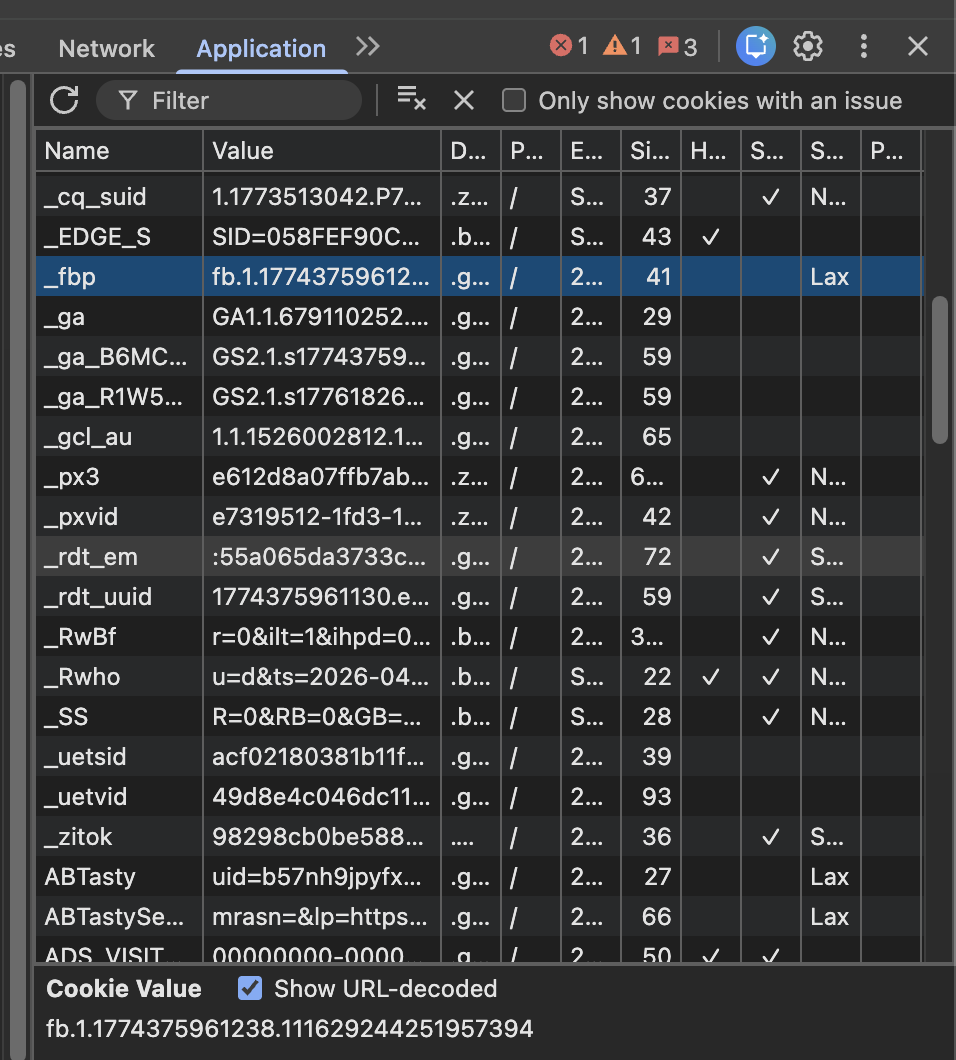
The fastest is to use your browser’s built-in developer tools. Open your website, right-click anywhere on the page, and select Inspect. From there, go to the Application tab if you’re using Chrome or Edge, or the Storage tab in Firefox, and click on Cookies in the left-hand panel. Every cookie currently stored for your domain will be listed there, along with its name, value, expiry date, and whether it’s first-party or third-party.
If you’d rather not dig into DevTools, free cookie scanning tools are an excellent alternative. Services like Captain Compliance offer a free cookie scanning tool and not as robust platforms offer tools as well such as CookieMetrix, Cookiebot’s free scanner, and OneTrust’s Cookie Scanner will crawl your entire site and produce a categorized report of every cookie that their scanning tools is able to find. This is often the easiest option for non-technical website owners and gives you a ready-made starting point for your cookie audit.
For a more thorough check, go back into DevTools and open the Network tab. Reload your page and look through the response headers for anything labeled “set-cookie.” This method picks up cookies being set by third-party domains — trackers and analytics scripts that load from external servers and may not appear in your primary cookie storage at all.
Finally, do a manual audit of everything installed on your site. Make a list of every plugin, theme, embedded script, and third-party service — then look up their cookie documentation. Google Analytics, Facebook Pixel, HubSpot, Intercom, YouTube embeds, Google Maps, and even some CDN providers all set cookies. Many do so the moment their script loads, before a user has clicked anything.
What Are Your Legal Obligations?
Once you’ve confirmed that your site uses cookies — and it almost certainly does — the question becomes what you’re legally required to do about it.
GDPR applies to any website that collects or processes personal data from people in the EU or UK, regardless of where your business is based. For cookies, this means you must obtain freely given, specific, informed, and unambiguous opt-in consent before setting any non-essential cookies. That consent must be just as easy to withdraw as it was to give.
The ePrivacy Directive — sometimes called the Cookie Law — works alongside GDPR and specifically governs the use of cookies and similar tracking technologies across the EU. It reinforces the requirement for prior consent and applies even in cases where GDPR might not.
CCPA and its successor CPRA apply to businesses that collect personal data from California residents and meet certain revenue or data volume thresholds. Unlike GDPR, CCPA operates on an opt-out model for most data — meaning you can set cookies by default, but you must give users a clear and accessible way to opt out of the sale or sharing of their personal information.
Canada’s PIPEDA requires meaningful consent for the collection of personal data, including through tracking technologies. The UK’s PECR mirrors the EU’s ePrivacy Directive post-Brexit and requires opt-in consent for non-essential cookies from UK visitors.
The key point across all of these laws is that being a small business or having a low-traffic site does not exempt you. GDPR fines can reach €20 million or 4% of global annual turnover, whichever is higher, and regulators have pursued action against companies of all sizes.
What You Need to Do to Comply
The first step is a proper cookie audit. Document every cookie your site sets — its name, category, purpose, lifespan, and whether it originates from your own domain or a third party. This audit is the foundation of everything else and needs to be kept up to date whenever you add new tools or plugins.
Next, publish a cookie policy. This is a page — or a clearly labeled section of your privacy policy — that explains in plain language what cookies you use, why you use them, and how visitors can manage or decline them. It needs to reflect the reality of your site, which is why the audit comes first.
Then implement a Consent Management Platform, commonly called a CMP. This is the tool that powers your cookie consent banner — the notice that appears when someone first visits your site. Under GDPR, the banner must give users a genuine choice. Pre-ticked boxes, hiding the “decline” option, and making “accept all” the only prominent button are all considered dark patterns and are explicitly prohibited. Popular CMP options include Cookiebot, OneTrust, CookieYes, and Usercentrics, most of which have direct integrations with WordPress, Shopify, and other common platforms.
One of the most common compliance mistakes is running a consent banner that doesn’t actually block anything. If a user declines analytics cookies but Google Analytics still loads and tracks them, your banner is decorative — not compliant. Your CMP must be configured to hold scripts from firing until the appropriate consent category has been accepted.
Finally, keep records of consent. Under GDPR, you must be able to demonstrate that a specific user gave consent, when they gave it, what they consented to, and which version of your policy was in effect at the time. A properly configured CMP will log this automatically.
Frequently Asked Questions
Does my site use cookies if I don’t use Google Analytics?
Quite possibly. Contact forms, social sharing buttons, embedded maps, live chat tools, newsletter signup widgets, and even certain web fonts can all set cookies. The only way to know for certain is to run a scan.
Do I need a cookie banner if my site only uses necessary cookies?
Not strictly — strictly necessary cookies don’t require consent under GDPR. But you still need to disclose that you use them in your cookie or privacy policy, and you need to be genuinely certain that no other cookies are being set in the background by your plugins or third-party tools.
I’m a small business. Do cookie laws still apply to me?
Yes. GDPR applies to any organization that processes personal data from EU residents, with no exemption for company size. CCPA has thresholds based on revenue and data volume, but many small businesses with meaningful web traffic still fall within scope.
What happens if I don’t have a cookie banner?
Data protection authorities across Europe have issued significant fines for cookie violations — including against SMEs and individual website operators. Beyond financial penalties, non-compliant sites face reputational damage and the risk of user complaints being filed with regulators, which can trigger formal investigations.
Does my mobile app use cookies too?
Mobile apps typically use analogous technologies rather than traditional browser cookies — things like device identifiers, advertising IDs, and SDKs. Most privacy laws treat these the same way as cookies, requiring disclosure and, in many cases, consent.
How often should I re-audit my cookies?
At minimum once a year or if you use Captain Compliance’s software it’s automated for you daily or weekly depending on your preference settings. . In practice, you should review your cookie setup any time you add a new plugin, integrate a new third-party service, or make significant changes to your site. Cookie inventories can change quickly and silently.
Put this into practice
Turn privacy guidance into working controls.
Captain Compliance helps teams discover tracking technologies, enforce consent, manage privacy requests and document the evidence behind every decision.


