Know what’s on your site before a plaintiff’s firm does
A free privacy audit shows which cookies, pixels and trackers are running — and which ones commonly appear in privacy claims.

Cookie consent banner design is no longer a UX decision. It is a legal decision with UX consequences. The regulators and courts that have spent the last three years systematically dismantling the fiction that a cookie banner equals consent have made one thing unambiguous: how a banner looks, what it says, and how it behaves technically are all subject to legal standards — and those standards have teeth that generic banner templates were never built to satisfy.
In 2026, an effective cookie consent banner is not the one with the highest acceptance rate. It is the one that produces legally valid consent under the frameworks that apply to your users, that holds up to a technical audit by a data protection authority, and that does not hand plaintiffs’ counsel the dark pattern evidence they need to open a class action. Building that banner requires understanding what the law actually requires — not what CMP vendors claim their default templates deliver — and translating those requirements into design and technical decisions that survive regulatory scrutiny.
This guide covers both. The legal requirements first, because design decisions that are not grounded in legal requirements are just aesthetics. The practical design guidance second, because legal requirements that are not translated into implementable specifications are just compliance theater.
What the Law Actually Requires
Cookie consent requirements today are not a single standard. They are a layered set of overlapping obligations drawn from GDPR, the ePrivacy Directive, US state privacy laws, and regulatory guidance that has accumulated into a body of enforceable design requirements. Understanding which layer applies to which users is the starting point for any compliant banner design.
GDPR and the ePrivacy Directive: The Strictest Standard
For users in the European Economic Area, the applicable standard is set by GDPR Article 7 and Recital 32, read together with the ePrivacy Directive’s requirement that consent be obtained before non-essential cookies are set. The requirements are specific and non-negotiable:
- Prior consent. Cookies that are not strictly necessary for the functioning of the service may not be set until the user has actively consented. A banner that loads while cookies are already firing does not satisfy this requirement regardless of what it says.
- Freely given. Consent must not be conditioned on acceptance of non-essential cookies as a requirement for accessing the service — the so-called “cookie wall” model — unless the user is offered a genuine equivalent alternative. Several DPAs have found cookie walls unlawful without meaningful alternatives.
- Specific. Consent must be obtained separately for each purpose. A single “accept all” mechanism without purpose-level granularity does not produce specific consent for each processing activity.
- Informed. The user must understand what they are consenting to before consenting. Vague descriptions of “analytics” or “personalization” without identification of the specific vendors and data uses involved do not satisfy the informed standard.
- Unambiguous. Consent must be expressed through a clear affirmative action. Pre-ticked boxes, continued browsing as consent, and scrolling as consent have all been held insufficient by EU DPAs.
- As easy to withdraw as to give. GDPR Article 7(3) is the provision that makes the equal-ease requirement a hard legal standard. A user must be able to withdraw consent through a mechanism that requires no more effort than the mechanism used to give it.
The French CNIL has been the most active enforcement body on banner design specifically. Its 2021 guidance established that accept and reject options must appear with equal prominence on the same banner surface — not with the reject option buried in a settings panel while accept is a single prominent button. The CNIL has fined Google, Facebook, and numerous other organizations specifically for banner designs that failed this standard, with fines reaching into the hundreds of millions of euros for the largest violations.
US State Privacy Laws: The Consent and Opt-Out Framework
US state privacy laws operate on a different consent architecture than GDPR — most use an opt-out model for general data collection rather than an opt-in model — but they impose specific banner design requirements that are increasingly enforced.
California’s CPRA and its implementing regulations at 11 CCR section 7004(a)(4) require that the means to opt out be at least as easy as the means to opt in. This is the US equivalent of GDPR’s equal-ease standard, and the California Privacy Protection Agency has made dark pattern enforcement a stated priority. The CPRA regulations specifically prohibit consent interfaces that use confusing language, require more steps to decline than to accept, or use visual design elements that discourage opt-out.
The Global Privacy Control requirement compounds the banner obligation. Under CCPA section 1798.135(b)(1) and its equivalents in Colorado, Connecticut, and other states, businesses must honor GPC signals as valid opt-out requests — meaning that a user who has set their browser to transmit a GPC signal has effectively opted out before they ever see your banner, and your technical implementation must reflect that without requiring any additional action from the user.
Twenty state privacy laws are now in effect, and while the consent mechanics vary, the convergent trend is toward stricter banner requirements, dark pattern prohibitions, and mandatory opt-out mechanisms that must function independently of banner interaction. A banner designed to meet only California’s requirements in 2023 may not meet the current requirements of Virginia, Colorado, Connecticut, Oregon, Texas, and the fifteen additional states with active privacy laws.
Dark Pattern Prohibitions: The Design Standard Courts Are Applying
Dark patterns in consent interfaces have moved from a regulatory guidance concern to an active litigation and enforcement target. The FTC’s 2022 dark patterns report, the CPPA’s enforcement guidance, the CNIL’s cookie enforcement actions, and the Norwegian Datatilsynet’s Telenor decision have collectively established a body of design standards that define what constitutes a manipulative consent interface.
The design patterns that are now legally problematic — not just bad UX practice, but legally actionable — include:
- Asymmetric prominence. Presenting the accept option in a visually dominant color, size, or position relative to the reject option. A green “Accept All” button alongside a grey “Manage Settings” text link fails this standard regardless of whether both options are technically present.
- Asymmetric path length. Requiring more steps to reject or customize than to accept. Accept in one click, reject after navigating to a settings panel and unchecking individual categories, is the pattern that has generated the most enforcement findings.
- Misleading language. Banner copy that frames acceptance as the positive or beneficial choice (“Accept to enjoy the full experience”) or that frames rejection as a loss (“Reject and get a degraded experience”) is manipulative under the standards multiple DPAs have articulated.
- Pre-checked categories. Presenting consent categories with boxes pre-checked is a direct GDPR violation — consent must be affirmative, and a pre-checked box requires the user to take action to withhold consent rather than to give it.
- False urgency or social proof. “Millions of users have accepted” or countdown timers pressuring acceptance are manipulative design patterns that several regulators have flagged specifically.
- Confirm-shaming. Reject button copy that frames the choice negatively (“No thanks, I don’t want a better experience”) is a manipulation pattern that the CNIL and others have addressed in guidance.
The Anatomy of a Compliant Cookie Consent Banner in 2026-2027
With the legal requirements established, here is what a banner that satisfies them actually looks like — broken down by component, with the specific design and technical decisions each component requires.
Layer One: The Initial Banner Surface
The initial banner is what the user sees first, before any interaction. Every compliant banner design decision begins here because this is the surface that regulators and courts evaluate first.
Accept and Reject must be on the same surface, with equal visual weight. Both options must appear on the initial banner — not with reject buried in a “Manage Preferences” flow. Equal visual weight means comparable button size, comparable color contrast against the background, and comparable placement. They do not need to be identical in appearance, but the differential cannot be sufficient to steer user choice. The safest design approach is identical button styling — same size, same shape, contrasting but equally prominent colors — for Accept All and Reject All on the initial surface.
A “Manage Preferences” or “Customize” option is required in addition to Accept and Reject, not instead of Reject. Many banner templates offer Accept and Manage Preferences as the two initial options, with Reject accessible only through the preferences panel. This fails the equal-ease standard. The three-button model — Accept All, Reject All, Manage Preferences — on the initial surface is the design architecture that satisfies both GDPR and US state requirements simultaneously.
Banner copy must be clear, neutral, and specific enough to be informative. The banner should identify the categories of cookies being used and the general purposes — analytics, advertising, functionality — without using language that frames acceptance as beneficial or rejection as negative. Vendor identification at the banner level is not required in every jurisdiction but is required for fully informed GDPR consent; a “see full list” link to a detailed vendor disclosure satisfies this requirement without cluttering the banner surface.
The banner must not appear after cookies have fired. This is a technical requirement that manifests as a design constraint: the banner must be the first thing that loads, with all non-essential tag firing blocked until a consent choice is recorded. A banner that appears 0.1 seconds after page load while cookies set in the background is not a consent mechanism — it is a disclosure with a retroactive consent request attached, which satisfies neither GDPR nor CCPA.
Render timing matters. Banners that take more than one to two seconds to render after page load create a window during which users may scroll or interact with the page — which some implementations incorrectly interpret as implied consent. The banner should render immediately, before meaningful page content is accessible, and should not be dismissible by scrolling or clicking outside the banner area.
Layer Two: The Preferences Panel
The preferences panel is where users who choose to customize their consent choices make purpose-level and vendor-level decisions. It must be accessible from the initial banner surface and must provide genuine granularity without steering users toward acceptance.
Categories must arrive unchecked for opt-in jurisdictions. Under GDPR, no consent category should be pre-selected. The user must actively check each category they wish to enable. This applies to analytics, advertising, personalization, and any other non-essential purpose — strictly necessary cookies do not require consent and should be clearly labeled as such, but they should not be presented in a way that implies the user has consented to them.
Category descriptions must be accurate and specific. “Analytics cookies help us understand how visitors interact with our website” is not sufficient for informed GDPR consent. The description should identify the specific vendors whose cookies fall in each category and the specific data those vendors collect. A linked vendor list satisfies this requirement for complex implementations.
Save and exit must default to the user’s actual selections, not to Accept All. A preferences panel “Save” button that records the user’s category-level choices is required. A “Save” button that records Accept All regardless of what the user selected in the panel is a dark pattern that multiple DPAs have specifically addressed.
Reject All must be available in the preferences panel as well as the initial surface. Users who open the preferences panel to review options should be able to reject all non-essential cookies from within that panel without needing to return to the initial banner surface.
Layer Three: Post-Consent Accessibility
Consent is not a one-time event under GDPR or most US state privacy laws. Users must be able to change their consent choices at any time, through a mechanism that is as accessible as the original consent interface.
A persistent consent preference link must be discoverable on every page. The standard implementation is a “Cookie Settings” or “Manage Consent” link in the site footer, present on every page, that reopens the consent interface with the user’s current choices displayed. This satisfies the withdrawal-as-easy-as-giving requirement across sessions.
Consent records must be stored and accessible. The CMP must maintain a record of each user’s consent choices — what was consented to, when, under which banner version — that can be produced to demonstrate compliance. Consent records are a standard request in GDPR subject access requests and regulatory investigations.
Banner re-triggering must occur when consent scope changes. If the site adds new cookie categories, new vendors, or new processing purposes that are not covered by existing consent records, the consent interface must be re-triggered to obtain consent for the expanded scope. Deploying a new advertising pixel without updating the consent framework and re-triggering consent is a compliance gap that technical monitoring will detect.
Layer Four: Technical Implementation Requirements
The most legally compliant banner design fails if the technical implementation does not enforce it. The design and the tag management architecture must be built together, not sequentially.
- Tag blocking must be enforced at the CMP layer, not just signaled. The CMP must actively prevent non-consented tags from firing — not simply signal consent state to tags that are then responsible for self-regulating. Tags that fire before reading the consent signal, or that fire despite a negative consent state, represent a technical implementation failure regardless of banner design quality.
- IAB TCF v2.2 implementation is required for sites running programmatic advertising. The TCF provides the standardized signal through which consent reaches downstream ad tech vendors. Without it, consent captured by the CMP does not reach the DSPs, SSPs, and data brokers that process user data in the advertising supply chain.
- Google Consent Mode v2 is required for sites using Google Ads or Google Analytics in the EEA. Google’s own requirements for publisher partners now mandate Consent Mode v2 implementation, and its absence affects both compliance and advertising performance.
- GPC signal detection and response must be implemented at the server or tag management layer. The GPC Sec-GPC header must be detected and must result in the suppression of sale and sharing of personal data — including advertising pixels — without requiring any additional banner interaction from the user.
Common Banner Failures That Create Compliance Exposure
The following are the most common banner design and implementation failures that generate regulatory findings and litigation exposure in the current enforcement environment. Each represents a pattern that appears frequently in technical audits of live production sites.
- Reject buried in settings. Accept on the initial surface, reject only accessible through a multi-step settings flow. The single most common dark pattern finding in DPA enforcement actions and privacy risk scans.
- Color differential steering. Accept in brand primary color, reject in grey or white. Technically both present, functionally asymmetric in the guidance regulators have issued.
- Pre-consent tracking. Tags firing before any banner interaction. Often caused by tag management container configurations that do not properly integrate with the CMP’s blocking mechanism.
- GPC non-honoring. Advertising and analytics trackers continuing to fire when GPC is enabled, either through misconfiguration or absence of GPC detection logic.
- Stale consent records. New vendors or purposes added without re-triggering consent, meaning the current tracking implementation is not covered by existing consent records.
- Banner version mismatches. The deployed banner and the CMP configuration are out of sync after a platform update, resulting in consent records that do not accurately reflect the choices users made.
- Mobile banner failures. Banner design that is compliant on desktop but presents differently on mobile viewports — truncating reject options, rendering accept more prominently due to responsive layout — creating a mobile-specific compliance gap.
Verifying Your Banner Before Regulators Do
A banner that looks compliant in a design review does not guarantee technical compliance in live production. The only way to know whether your banner is performing as designed — whether tags are blocked before consent, whether GPC is honored, whether the reject path requires equal effort to the accept path, whether pre-consent trackers are firing — is technical verification against real traffic.
Compliance teams should conduct technical banner verification at minimum quarterly, after any CMP configuration change, after any tag management update, and after any significant front-end deployment. The verification should cover the full consent state cycle — before interaction, after reject, after accept — and should include a GPC pass that confirms opt-out signal handling. Findings should be documented with dated, preserved evidence that can be produced in response to a regulatory inquiry or litigation discovery request.
The gap between what a banner is designed to do and what it actually does in production is where regulatory exposure accumulates. Closing that gap is not a design problem — it is a monitoring problem, and it requires the same systematic approach that any other compliance risk requires: defined scope, regular cadence, documented findings, and a remediation process that closes identified gaps before external scrutiny surfaces them.
Captain Compliance Can Help You With Cookie Consent

Alana Gibson, Chief Operating Officer at DGR Legal, says:
“Cookie consent is a user’s explicit permission to allow a website to store or retrieve information on their device, ensuring compliance with privacy laws like the GDPR.”
These are small text files (no larger than 4096 bytes) and serve to track user preferences and behavior and personalize their user experience on a website.
Websites must show cookies to the user the first time they visit and obtain their consent to use them. They can do this via a banner, a pop-up, or as part of a privacy policy and give them the option to accept or reject cookies.
Failing to do this leads to fines and reputation loss for the business.
Why is it Important to Have a Good Cookie Consent Design?

The EU’s General Data Protection Regulation (GDPR) and most other data protection laws require obtaining consumer consent through cookies. However, the GDPR only deals with protecting the consumer’s data privacy, not ensuring a good user experience or design. A well-designed cookie banner that follows cookie law is crucial for several reasons:
Legal Compliance
A well-designed cookie consent banner ensures that your business is compliant with the GDPR or another data privacy regulation that applies to you. This also includes avoiding penalties for not complying with cookie consent by ensuring you obtain explicit consent.
User Experience
One of the most important requirements for a good CMP also known as a cookie consent banner is that it’s non-intrusive (or at least as minimally as possible). It should also allow visitors to engage with the website while providing clear choices to safeguard their data.
Transparency & Trust
Finally, a well-designed banner will showcase the business’ commitment to respecting their consumers’ choices regarding their personal information and build trust with them.
Want a cookie consent solution that is compliant, provides excellent user experience, and is fully transparent? Contact us today for a free consultation on how you can do this.
Traits of a Good Cookie Consent Design
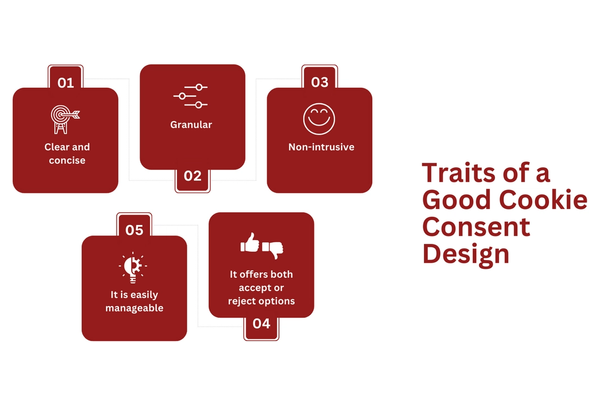
So, what makes a good cookie consent design?
Alana Gibson says:
“A good cookie consent banner is transparent, easy to understand, and provides clear options for consent, ensuring users make informed decisions about their data.”
Let’s expand on a few of key features that make a cookie consent banner good:
1. Clear and concise
A cookie consent banner should clearly inform the visitor about the cookies the website is using and their purpose. There is no confusion, and it is fully transparent.
Cookies fall into four categories: strictly necessary, performance, marketing, and functional. The website visitor should understand what each of these types means to be able to make an informed decision when it comes to giving away their personal data.
2. Granular
Next, a good cookie banner should offer real control over their data and privacy preferences. This means more than giving them the option to “Accept All” or “Reject All,” as most banners look like. Instead, they have to allow users to choose the cookie categories they want to accept.
3. Non-intrusive
You probably had the misfortune of visiting a website whose cookie consent popup would take the entire screen at least once (probably a lot more, but okay). Let’s face it: you probably didn’t stay long on that website.
Maria Chamberlain, Owner of Acuity Total Solutions, says:
“A good cookie consent banner is like a polite waiter, asking for permission before serving digital treats. A small polite slide-in yes or no window that can be expanded is much more polite than having a full-page menu shoved in your face.”
This means the cookie consent banner should be as non-intrusive as possible (it’s impossible to be completely non-intrusive, unfortunately). This is where the banner placement, size, and color palette become crucial.
Namely, the banner should fit as much as possible within the overall design of the website but be at the same time distinct enough so it’s not confused with the rest of the page.
4. It offers both accept or reject options
Website owners would probably like to be able to put a big “accept all” button on their cookie consent popups. Unfortunately for them, they can’t do that. Instead, they must give visitors both the option to accept and reject the use of cookies instead of forcing their hand by only providing the “accept” option.
5. It is easily manageable
Once the user sets cookies, they should be able to modify them at any time via a prominent link or a button on the webpage.
Need help creating a good cookie consent banner that is fully compliant? Contact us today for a complimentary consultation on how you can do this.
Traits of a Bad Cookie Consent Design
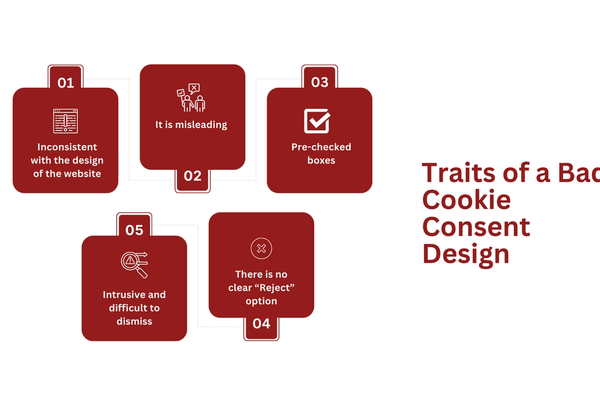
Creating a bad cookie consent design is easier than creating a good one. No surprise there.
For one well-designed banner, there are at least a dozen, if not more, poorly-designed ones out there that provide a poor user consent experience.
What are the traits of a bad cookie consent design should a business avoid? That’s what we’ll cover here:
1. It is inconsistent with the design of the website
We already mentioned that the cookie banner should be consistent with the overall design and theme of the website.
For instance, if the website’s main color is blue, the cookie consent banner should also be in that color.
2. It is misleading
In an attempt to have users accept cookies, some websites use misleading or deceptive language.
For example, this can imply that certain website functions would not be available if certain cookie categories are not accepted, even when that’s not the case.
3. Pre-checked boxes
Another bad practice regarding cookie consent banner design is to have pre-checked boxes. Essentially, this means that the business is already choosing for the consumer. What’s more, if you want to be GDPR-compliant, then you have to adopt an “opt-in” approach rather than an “opt-out” one, and pre-checked boxes are a definite opt-in approach.
4. There is no clear “Reject” option
Many websites use a little trick to ensure the user accepts their cookies by making the “Accept All” button more prominent than the other consent buttons. Is this underhanded? Yes, but it’s not against any regulations. That is, as long as the “Reject” option is there and is clear for the user to take it.
5. Intrusive and difficult to dismiss
Cookies should be a barrier for the consumer to use and enjoy the website they are visiting. Yet, they are often designed or placed in a way that makes them intrusive or difficult to dismiss. The banner or pop-up should never cover the webpage content or be designed so that it makes it hard to close if the user doesn’t want to deal with it right away.
Importance of Experimentation for Cookie Consent Design
There is no one-size-fits-all when it comes to cookie consent design.
What works for one website will not work for the other.
This will depend on the type of data your business is collecting for the most part. For instance, if your website is only available in one language (i.e. English), then there’s no need to have language preference cookies. You should carefully consider your consumers and your industry when it comes to cookie consent design and experiment with it until you find what works best for your business.
Frequently Asked Questions (FAQs)
Do you need a cookie consent banner?
Yes. A cookie consent banner is necessary if you want your website and business to be compliant with GDPR or another applicable data privacy law.
Here is everything you need to know about cookie consent requirements.
What must a cookie banner include?
While there are no clear rules as to how a cookie banner should look, there are still some essential elements that you should include.
These are:
Header (for instance, “Cookie Consent”)
A brief message informing the visitors that the website uses cookies(for instance, “We use cookies to provide a better user experience to our visitors”)
Accept and Reject buttons that are separate and distinct
Granular consent options allow the visitor to select which cookies they’d like to accept or reject
“X” button to enable the user to easily dismiss the banner if they don’t want to interact with it at the moment
Cookie Settings Management to allow users to modify their cookie consent preferences at any time
Learn more links that will lead to the privacy page or other page where the consumer can find more information about how the website uses cookies and their purposes.
Learn more about cookie consent best practices.
How does a cookie consent banner work?
A cookie banner displays the message to the website visitors when they first visit a website that it uses cookies and ask for their permission (consent) to use non-essential or strictly necessary cookies). Typically, it appears at the bottom of the webpage and stays there until the user interacts with it (accepts all cookies, rejects all, accepts essential cookies, or dismisses (closes) the cookie consent banner).
Learn everything you need to know about the cookies policy.
Why is my cookie consent banner not showing?
Have you heard of Global Privacy Control? There are plugins that may stop a cookie consent banner from being seen if you have it on. Also, your cookie consent banner might not be showing for many reasons, including the following:
Your site is not live yet
You didn’t enable the cookie widget or plugin (for example, JetPack, if you’re using it)
Your browser is set to send a “Do Not Track” (DNT) signal, which automatically rejects all cookies
There are problems with the JavaScript code that are preventing the cookie consent banner from appearing
The visitor has already accepted or rejected cookies
Here are our 8 GDPR WordPress cookie consent plugin picks.
How Can Captain Compliance Help You?
Taking all this into account, an investment in designing user-centric cookie consent banners should result in better GDPR compliance and higher customer satisfaction levels for organizations looking to succeed in today’s digital age.
If you want to provide a positive user experience through cookies, Captain Compliance can help you implement cookie consent on your website. Get in touch today for a free consultation to ensure complete data privacy compliance on your website.
Put this into practice
Turn privacy guidance into working controls.
Captain Compliance helps teams discover tracking technologies, enforce consent, manage privacy requests and document the evidence behind every decision.