Home » Education » Cookies » Tracking Pixel vs. Cookie: Differences, How They Work Together, and Legal Risks
Tracking Pixel vs. Cookie: Differences, How They Work Together, and Legal Risks
Published
Table of Contents
In November 2025, a federal court in California allowed a lawsuit against Adidas to proceed on the theory that its website’s tracking pixels violated a 1967 wiretapping statute. A few months later, a health system agreed to a $3.1 million class action settlement over the same underlying technology — a pixel, quietly reporting page activity to an ad network. Pixels and cookies are often described as interchangeable “tracking tools.” Legally and technically, they are not the same thing, and increasingly, the difference is exactly what a plaintiff’s firm or a regulator is looking for.
This guide covers every angle of the pixel-vs-cookie question: what each one actually is, the technical and legal differences, how they work together (retargeting couldn’t exist without both), and — the part most comparison articles skip entirely — why getting this distinction wrong has become an active source of litigation risk.
Pixel vs. cookie: the quick answer
A cookie is a small text file stored in a user’s browser that a website reads on future visits to recognize that user.
A tracking pixel (also called a web beacon, marketing pixel, or pixel tag) is a tiny, invisible piece of code — often a 1×1 transparent image — that fires a request to a server the instant a page or email loads, without storing anything on the user’s device.
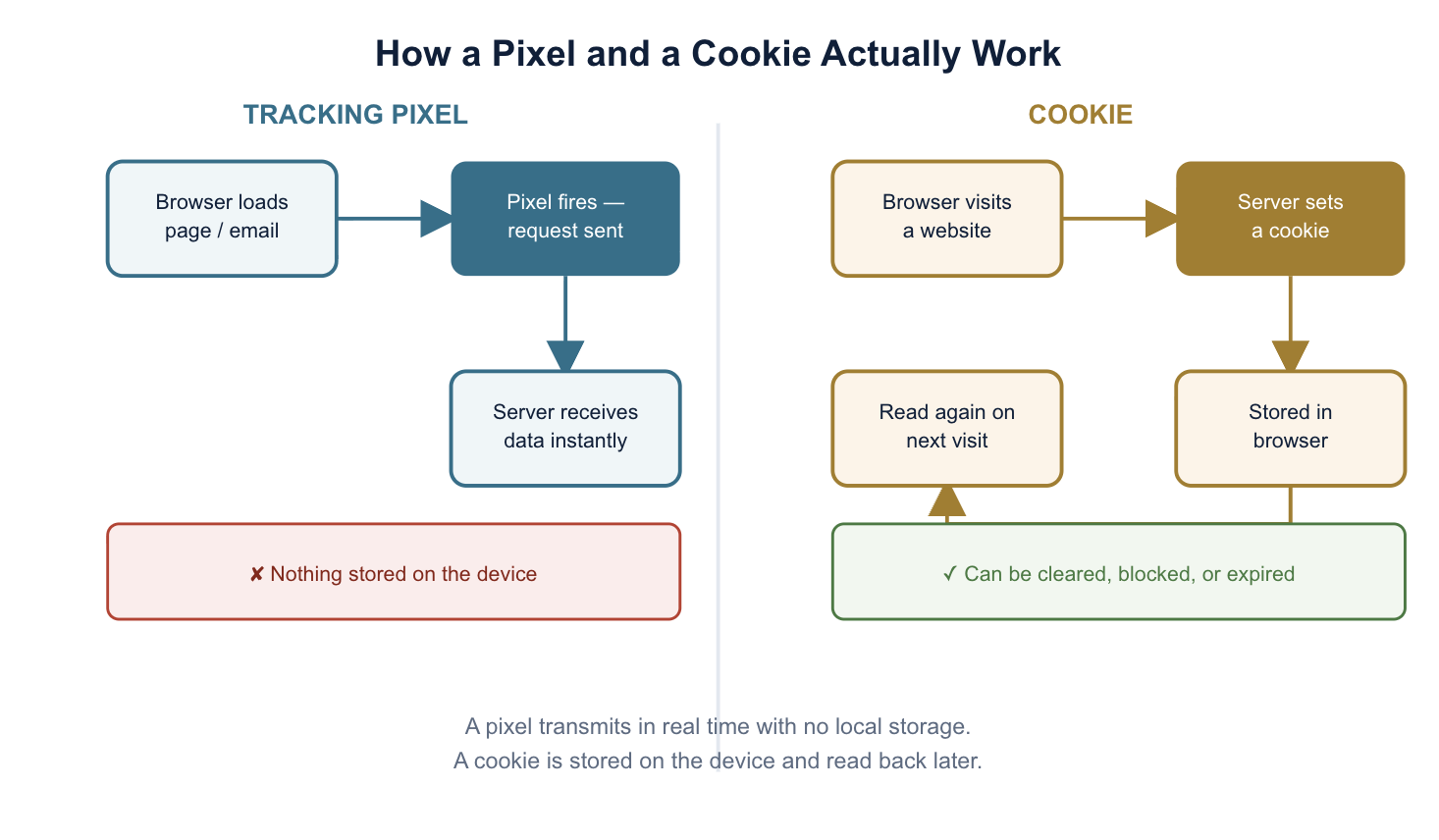
The core distinction: cookies store data on the device; pixels transmit data to a server in real time.
They’re frequently used together — a pixel fires and drops a cookie in the same instant, which is how most retargeting ads work.
Pixels can’t be blocked or deleted by clearing your browser the way cookies can, since nothing is stored locally — that also makes them a growing focus of wiretapping-style litigation under laws like California’s CIPA.
What is a cookie?
A cookie is a small piece of data — typically just a name, a value, and a handful of settings — that a website asks your browser to store on your device. Your browser holds onto it and sends it back to that site on future requests, which is how the site recognizes you across pages and visits: keeping you logged in, remembering your cart, and personalizing content.
Cookies generally break down into a few types:
Session cookies: deleted when the browser closes; used for logins and shopping carts.
Persistent cookies: have a set expiration date and survive across visits; used for remember-me logins and preferences.
First-party cookies: set by the site you’re actually visiting.
Third-party cookies: set by an outside domain (usually an ad network), used to track behavior across multiple sites.
What is a tracking pixel (web beacon, marketing pixel)?
A tracking pixel is a tiny, usually invisible 1×1 transparent image or snippet of code embedded in a webpage, email, or digital ad. The name is more about history than the technology today — the same function is now often implemented as a JavaScript snippet rather than a literal image file, but “pixel” stuck as the industry term. You’ll also see it called a web beacon, marketing pixel, or pixel tag — these all refer to the same underlying mechanism.
When the page or email loads, the pixel’s request fires to a remote server, carrying information like the page URL, timestamp, IP address, browser and device details, and (increasingly) a hashed identifier tied to the user. Unlike a cookie, nothing is stored on the visitor’s device — the data goes straight to the server at the moment of the request.
The most common types of tracking pixels:
Retargeting pixels: Fire when a visitor views a page, then help serve that visitor ads for the same product or brand on other sites later.
Conversion pixels: Fire when a specific action happens — a purchase, a signup, a form submission — to measure campaign performance and attribution.
Email open (tracking) pixels: Embedded in an email; fire the moment the email is opened, letting the sender know it was read, and often when and from what device.
Analytics pixels: Fire on page load to report basic traffic and behavior data back to an analytics platform.
Pixel vs. cookie: side-by-side comparison
Tracking pixel
Cookie
Where data lives
Sent directly to a server; nothing stored on the device
Stored in the user’s browser
When it fires
The instant the page/email/ad loads
Set on first visit; read again on later visits
Visible to the user?
No — invisible by design
Visible via browser dev tools; disclosed via cookie banners
Can the user block or delete it?
Not directly — there’s nothing stored locally to clear
Yes — via browser settings, private browsing, or extensions
Works across devices?
Better cross-device consistency (server-side)
Tied to a specific browser/device
Affected by ad blockers?
Can still fire server-side in some implementations
Commonly blocked outright by ad blockers and browser settings
Typical data captured
IP address, timestamp, device/browser info, page/email context
Session ID, preferences, login state, browsing history (third-party)
Common uses
Retargeting, conversion tracking, email opens
Logins, carts, personalization, ad targeting
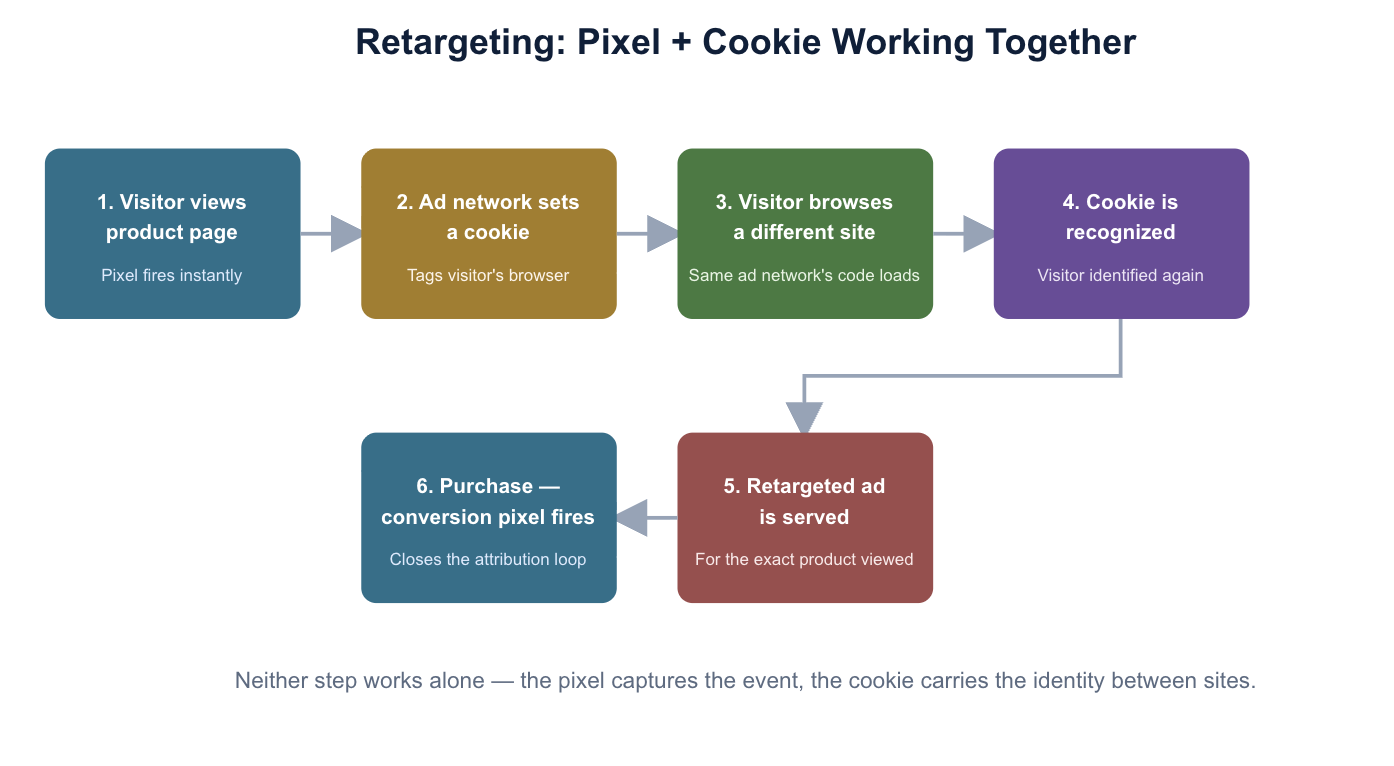
How pixels and cookies work together
In practice, most cross-site advertising depends on both technologies working in sequence, not on either one alone:
A visitor lands on a product page. A retargeting pixel embedded on that page fires immediately, sending the page URL and a device identifier to the ad network’s server.
In the same moment, that ad network sets a third-party cookie in the visitor’s browser, tagging them as “viewed this product.”
The visitor leaves and browses a different, unrelated website that also carries the same ad network’s code.
That site checks for the cookie, recognizes the visitor, and calls the ad network, which serves an ad for the product they viewed earlier.
When the visitor eventually clicks or purchases, a conversion pixel fires again, closing the loop and attributing the sale back to the original campaign.
This is why “pixel vs. cookie” is often the wrong framing for a marketing decision — the real question is usually how the two are combined, and increasingly, what happens to measurement when one half of that pair (the cookie) gets blocked.
The state of third-party cookies in 2026
This is worth stating plainly, since a lot of older articles online are now out of date: Google abandoned its plan to deprecate third-party cookies in Chrome in 2024. Instead of a hard block, Chrome now offers a user-controlled “Privacy and security” setting where individuals can choose to block third-party cookies themselves. Safari and Firefox, by contrast, have blocked third-party cookies by default for years. The practical effect: roughly half of web traffic is already effectively cookieless depending on browser mix, while Chrome traffic remains a patchwork of cookie-enabled and cookie-blocked users based on individual settings.
This is precisely why pixels — and increasingly, server-side tracking (sending event data directly from a business’s own server to a platform like Meta’s Conversions API or Google’s Enhanced Conversions, bypassing the browser and cookies entirely) — have become more central to measurement strategy than cookies alone. It’s also why the compliance conversation has shifted: pixels can’t be cleared the way cookies can, so disclosure and consent now matter just as much (arguably more) for pixels as they do for cookies.
Privacy law and litigation risk: where pixels and cookies actually differ
This is the section most “pixel vs. cookie” comparisons skip, and it’s the one with the most financial consequence in 2026.
Cookie consent requirements
Cookies are the more heavily regulated of the two in the traditional sense: GDPR, the ePrivacy Directive, and most U.S. state privacy laws (CCPA/CPRA and its peers) require disclosure and, for non-essential cookies, active consent via a banner before they’re set. This is well-trodden compliance ground with mature tooling behind it.
Pixels and wiretapping-style litigation
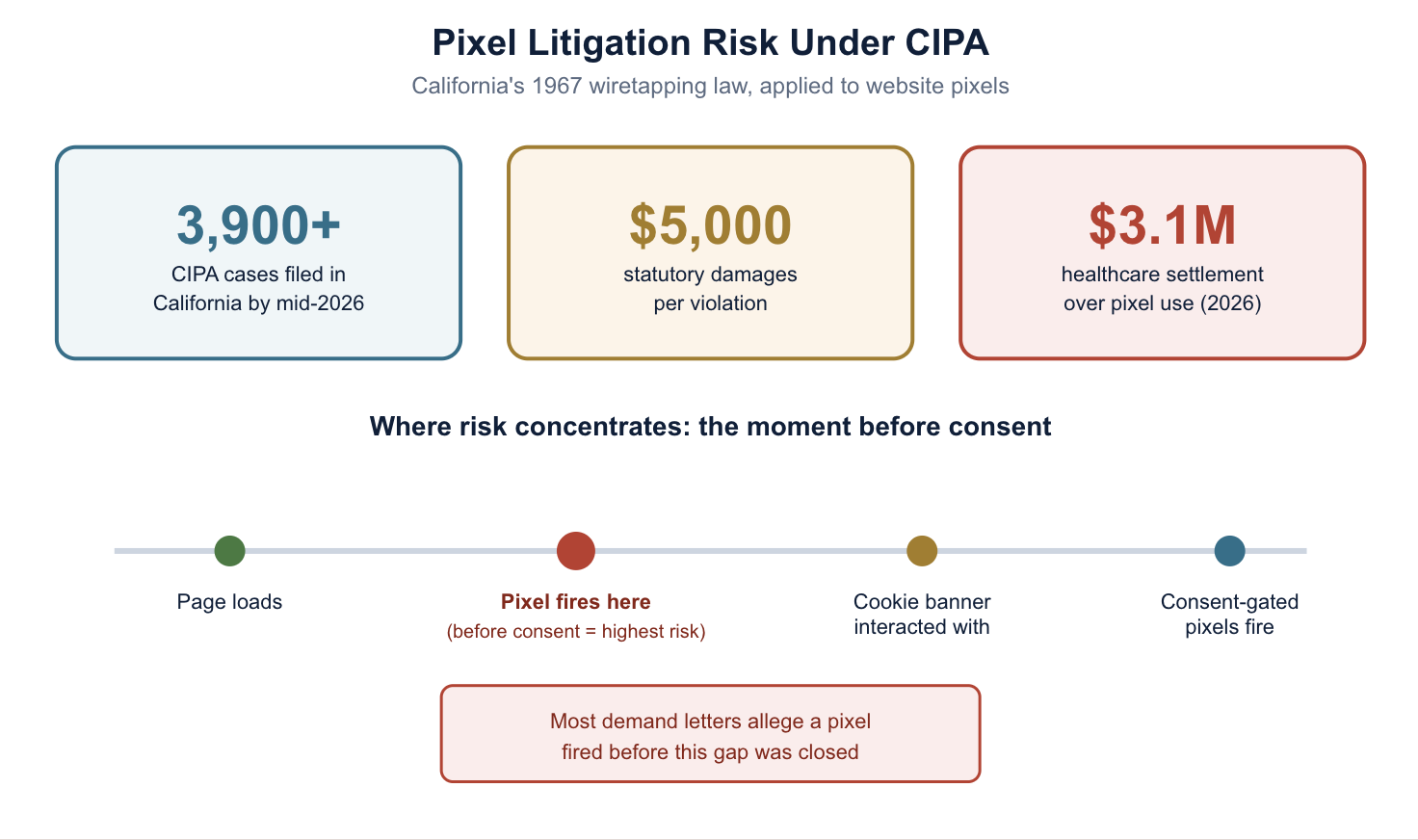
Pixels have become the center of a different, faster-moving risk: lawsuits filed under old wiretapping and “pen register” statutes, most prominently the California Invasion of Privacy Act (CIPA). Originally written in 1967 to cover phone taps, CIPA is now being applied to website pixels, session replay tools, and chat widgets on the theory that they “intercept” a visitor’s communications with a website before meaningful consent is given.
More than 3,900 CIPA cases have been filed in California alone as of mid-2026, with retail, technology, and professional services the most frequently targeted industries.
CIPA carries statutory damages of up to $5,000 per violation, which is what makes these cases attractive for class certification even without proof of actual harm.
Healthcare has been a particular flashpoint: a 2026 class action settlement of $3.1 million resolved claims that a health system’s website and patient portal used Meta and Google pixels that shared appointment types and other sensitive details with ad networks without consent.
These claims aren’t limited to obviously “sensitive” sites — a November 2025 case allowed claims against a major apparel retailer’s pixel use to proceed past a motion to dismiss.
Most cases begin as a pre-litigation demand letter, not a filed lawsuit — alleging that a specific tracking pixel fired before a visitor interacted with a cookie banner or otherwise consented.fThe pattern across nearly all of these cases is timing: courts and plaintiffs are increasingly focused on the exact moment a pixel fires relative to when consent was given — not just whether a privacy policy mentions pixels somewhere on the page. A pixel that fires on page load, before any cookie banner has been interacted with, is the fact pattern showing up again and again in these filings.
Compliance checklist: reducing pixel and cookie risk
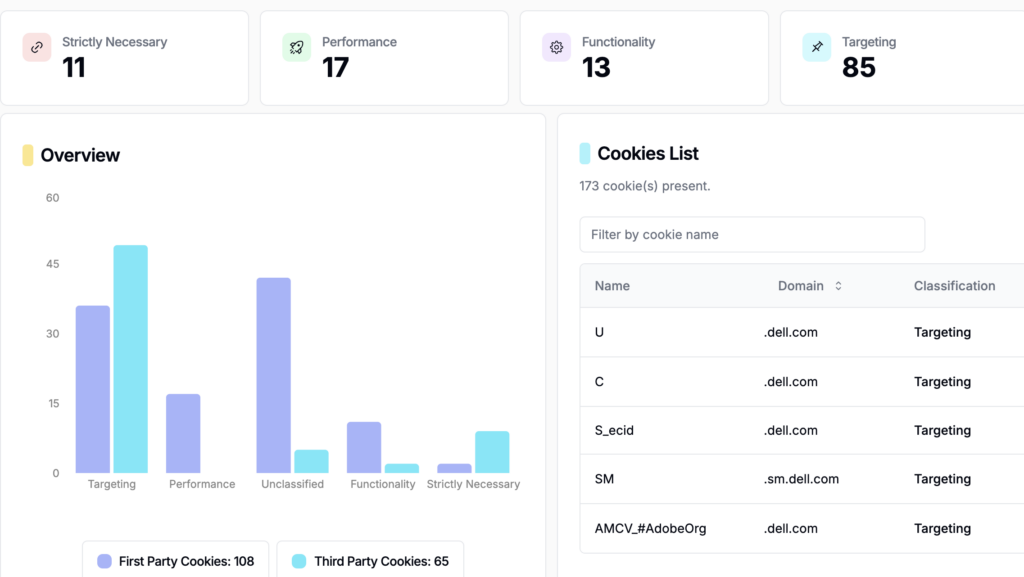
Inventory every pixel and cookie actually firing on your site — not just the ones your team remembers adding. Third-party tags accumulate faster than most teams track.
Gate non-essential pixels behind consent so they don’t fire until a visitor has actually made a choice in your cookie banner — not just that a banner is present on the page.
Treat pixels and session-replay tools with the same scrutiny as cookies in your privacy disclosures, since litigation isn’t limiting itself to cookies.
Review vendor contracts with any ad-tech or analytics company receiving pixel data, particularly around healthcare, financial, or other sensitive-data contexts.
Re-test regularly. A pixel or cookie banner that worked at launch can silently break after a site redesign or a new vendor integration — and “it used to work” isn’t a defense regulators or plaintiffs accept.
Consider server-side tagging for measurement that needs to survive cookie blocking, while making sure the consent logic still applies before that server-side call fires.
How Captain Compliance helps
The gap between “we have a cookie banner” and “every pixel on our site actually respects it” is exactly where the CIPA litigation above keeps landing. Captain Compliance continuously scans your site for every cookie, pixel, and tag actually firing — including third-party pixels added by vendors without your marketing team’s knowledge — and keeps consent gating, disclosures, and vendor contracts current, backed by IAB TCF validator certification.
No. A pixel transmits data directly to a server the moment it fires and stores nothing on the user’s device. A cookie is stored in the browser and read again on future visits. They’re often used together but are technically and legally distinct.
What is the difference between a web beacon and a cookie?
A web beacon is another name for a tracking pixel — a tiny, usually invisible piece of code that reports data to a server on load. The difference from a cookie is the same as pixel vs. cookie generally: a beacon transmits in real time with no local storage; a cookie is stored on the device.
Can pixels track users without cookies?
Yes. A pixel’s core function — firing a request to a server with page and device information — doesn’t require a cookie at all. That said, pixels are frequently paired with a cookie in the same request so a site or ad network can recognize the same visitor again later; without that cookie, the pixel alone typically can’t link separate visits from the same person as reliably.
Are tracking pixels legal without user consent?
It depends on jurisdiction and how the pixel is used, but the legal risk has grown substantially. Under GDPR and most U.S. state privacy laws, non-essential pixels generally require the same disclosure and consent treatment as non-essential cookies. Separately, in California, plaintiffs have filed thousands of lawsuits under the state’s wiretapping statute (CIPA) alleging that pixels firing before consent constitute an unlawful interception, with statutory damages up to $5,000 per violation.
Which is more commonly used today, pixels or cookies?
Both remain widely used and are typically deployed together rather than as alternatives. However, as browsers increasingly restrict third-party cookies by default or by user choice, pixels (particularly paired with server-side tracking) have become relatively more important for measurement that needs to survive cookie blocking.
Do I need to disclose pixels in my cookie banner?
In most cases, yes. Regulators and courts increasingly treat pixels the same as cookies for disclosure purposes, and several recent lawsuits have specifically targeted pixels that fired before a visitor interacted with a cookie banner at all — meaning the banner’s existence didn’t matter because the pixel wasn’t actually gated by it.