IAB TCF v2.3 Compliance with Captain Compliance
The IAB’s Transparency and Consent Framework (TCF) is a standardized framework designed to ensure transparency and compliance in digital advertising practices explicitly addressing GDPR requirements. It provides guidelines and technical specifications for Consent Management Platforms (CMPs) to manage user consent and preferences regarding data processing activities.
By aligning with this industry standard, Captain Compliance has registered and obtained IAB certification as a CMP, adding credibility and value to the platform.
To get started, Sign up on Captain Compliance and try it for free.
Starting July 31, 2024, to comply with the EU User Consent Policy, websites utilizing Google publisher products (such as AdSense, Ad Manager, or AdMob) must implement a certified CMP that integrates with the TCF to serve ads to users in the EEA, UK and Switzerland. Captain Compliance is a Google-certified CMP for compliance with IAB TCF.
Implementation of Captain Compliance IAB Consent Framework
We will help you setup to be compliant with the TCF for professional tiers and above.
To implement the IAB consent framework, follow the below steps:
- Navigate to Dashboard > Website > Scan Website to inventory all the cookies & pixels
- In the left side tab, select Consent
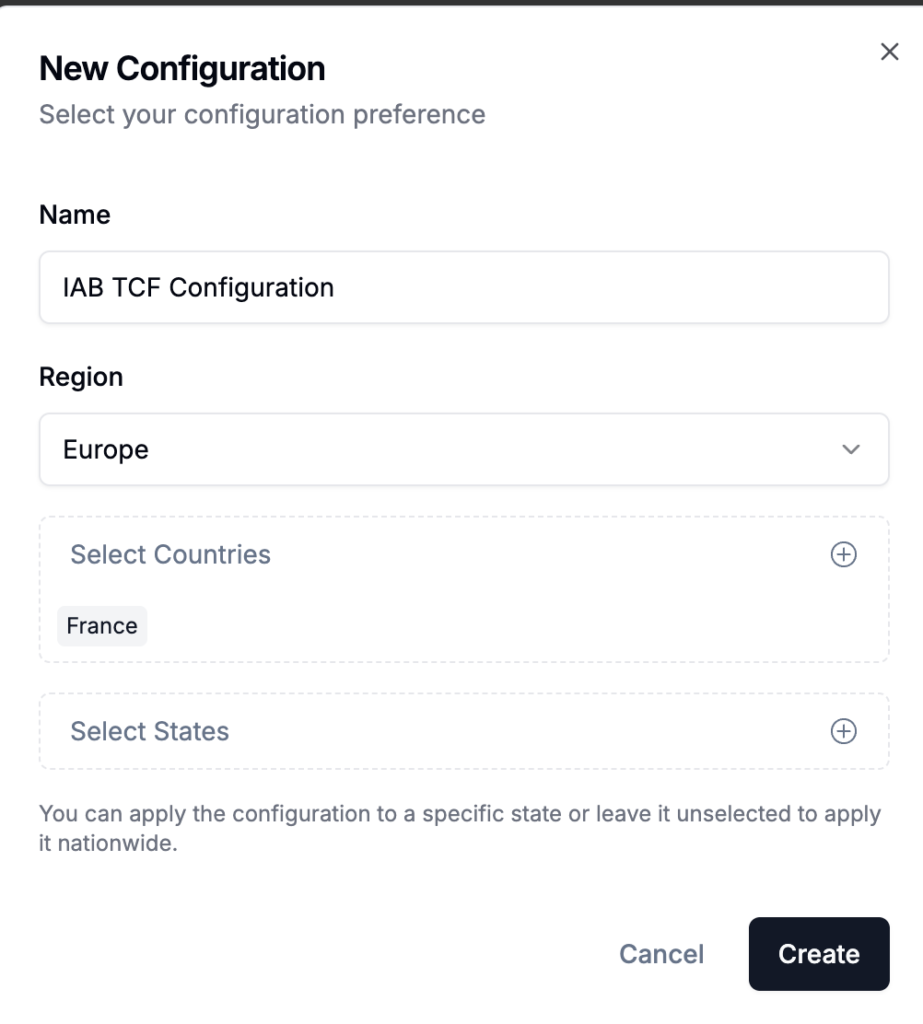
- Select configuration
- Click Publish Changes.
Dashboard > Consent > Configuration
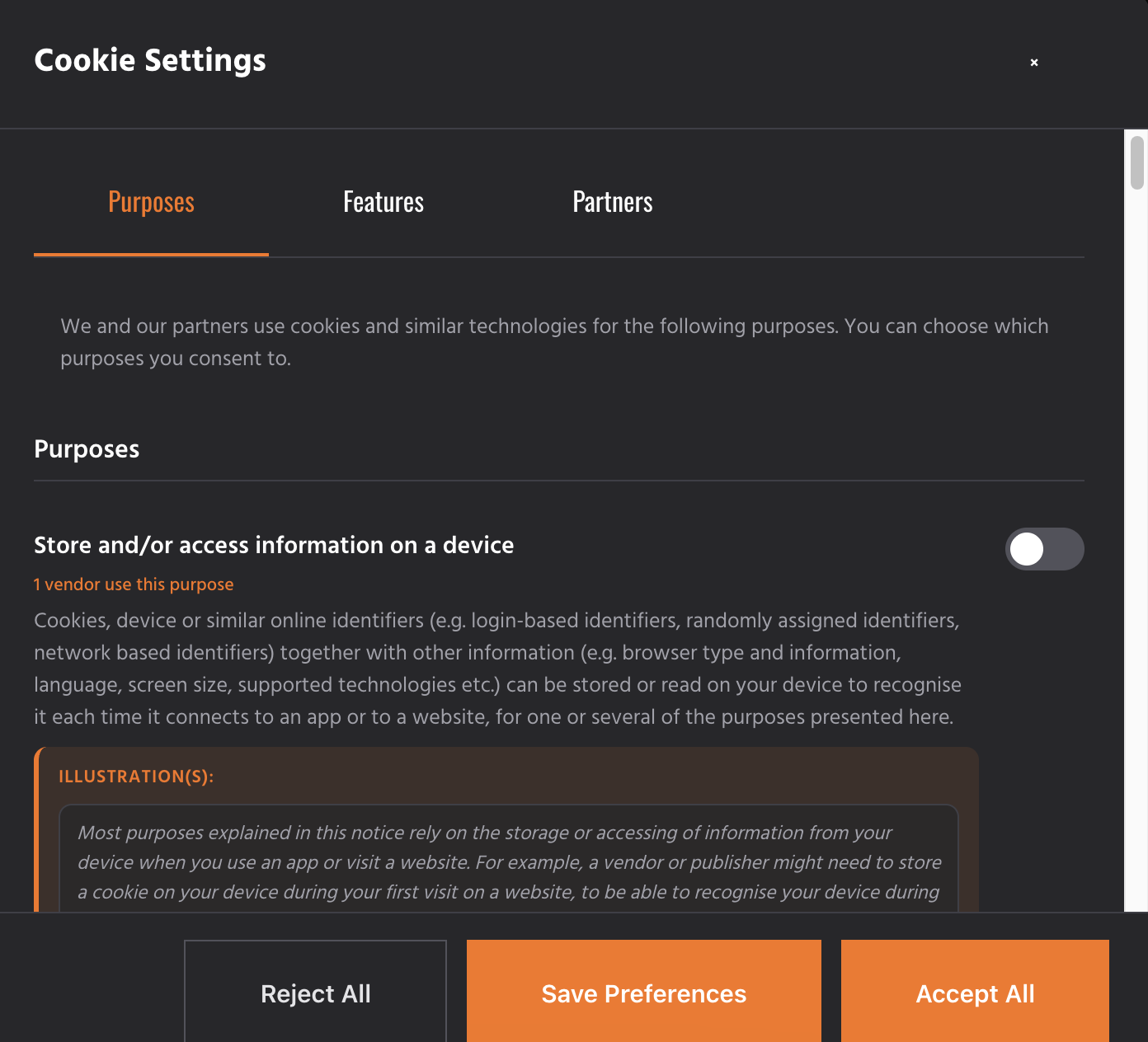
Once you publish the changes, your site will automatically display the TCF-compliant consent banner to users who access it from the applicable regions.
A user’s consent information includes their choices or preferences regarding vendors, purposes, and special features defined within the TCF framework. Once enabled, IAB TCF sends consent signals to vendors through the Consent Management Platform (CMP) when the user interacts with the website. These signals indicate the user’s consent preferences for each vendor and purpose. These signals help vendors determine whether they have the user’s consent to process their data for specific purposes.
In the case of the cookie banner, you will notice a longer text in the first and second layers of the cookie banner, which is non-editable as IAB TCF v2.3 enforces strict policies on the wordings used to ensure clear and concise information for users about the collection and processing of their data.
IAB Europe has approved the consent banner text for Captain Compliance, and we do not enable the alteration of IAB TCF text to ensure TCF compliance.
IAB Configuration Options
Captain Compliance allows additional customization of the IAB TCF implementation using the window.iabConfig object. These optional configurations enable you to control vendor access, manage Google Ad Tech providers, and adjust default consent behavior.
All configuration parameters must be added before the Captain Compliance script within the <head> tag of your website or via Google Tag Manager or your choosing of an alternative tag manager.
You can configure one or more options within the same window.iabConfig object depending on your requirements.
Available Configuration Parameters
| Parameter | Type | Description |
|---|---|---|
allowedVendors |
Array | Specifies the vendors from the IAB Global Vendor List that are allowed to access user consent signals on your website. Only the listed vendor IDs will be permitted. |
allowedGoogleVendors |
Array | Specifies which Google Ad Tech providers are allowed to access consent signals. Only the listed Google provider IDs will be permitted. |
defaultLegitimateConsent |
Boolean | Controls whether legitimate interest consent is enabled by default. By default, legitimate interest consent is enabled for all applicable vendors and purposes. Setting this value to false disables legitimate interest consent by default. |
Configure Vendor and Consent Settings
You can customize vendor access and consent behavior using the window.iabConfig configuration options described above.
Restrict Vendors
You can restrict which vendors from the IAB Global Vendor List are allowed to access consent signals on your website.
<script>
window.iabConfig = {
  allowedVendors: [vendorId1, vendorId2, vendorId3]
}
</script>
You can obtain the Vendor ID (numeric value) either from the Standard Vendor List or IAB’s TCF Vendor List.
The below example illustrates the configuration of a website that allows access to the vendors “Vendor_A”, “Vendor_B” and “Vendor_C” with Vendor ID 8, 27 and 53.
<script>
window.iabConfig = {
  allowedVendors: [8, 27, 53]
}
</script>
Restrict Google Ad Tech Providers
You can restrict which Google Ad Tech providers are allowed to access consent signals on your website.
<script>
window.iabConfig = {
  allowedGoogleVendors: ['google_id1', 'google_id2', 'google_id3']
}
</script>
The google_id will be a numeric value, which can be obtained from the Google Ad Tech Providers List.
The below example illustrates the configuration of a website that allows access to the Google Ad Tech Providers “google_D”, “google_E” and “google_F” with Google Ids 46, 70 and 159.
<script>
window.iabConfig = {
  allowedGoogleVendors: [46, 70, 159]
}
</script>
Restrict Vendors and Google Ad Tech Providers
If you wish to control both the Vendor list and Google Ad Tech Provider list concurrently, you can simply configure and add the following code snippet before the Captain Compliance script within the head tag:
<script>
window.iabConfig = {
  allowedVendors: ['vendor_id1', 'vendor_id2', 'vendor_id3'],
  allowedGoogleVendors: ['google_provider_id1', 'google_provider_id2', 'google_provider_id3']
}
</script>
The below example illustrates the configuration of a website that allows access to the vendors “Vendor_A”, “Vendor_B” and “Vendor_C” with Vendor Ids 8, 27 and 53 as well as Google Ad Tech Providers “google_D”, “google_E” and “google_F” with google Ids 46, 70 and 159.
<script>
window.iabConfig = {
  allowedVendors: [8, 27, 53],
  allowedGoogleVendors: [46, 70, 159]
}
</script>
Set Default Legitimate Interest Consent
By default, when IAB TCF v2.3 is enabled, legitimate interest consent is enabled for all applicable purposes and vendors. This means vendors that rely on legitimate interest as a legal basis can process data unless the user changes their preferences.
To disable legitimate interest as the default legal basis, configure the defaultLegitimateConsent parameter in the window.iabConfig object.
<script>
window.iabConfig = {
  defaultLegitimateConsent: false
}
</script>
When defaultLegitimateConsent is set to false, legitimate interest is not enabled by default. Vendors that rely on legitimate interest must then obtain explicit user consent through the consent banner before processing data.
The below example illustrates the configuration where vendor access is limited and legitimate consent is disabled by default.
<script>
window.iabConfig = {
  defaultLegitimateConsent: false,
  allowedVendors: [8, 27, 53],
  allowedGoogleVendors: [46, 70, 159]
}
</script>
Google’s Additional Consent Mode
In addition to IAB TCF v2.3, Captain Compliance also supports Google’s Additional Consent Mode. With this feature, websites can obtain user consent for Google’s Ad technology providers that may not be registered on the IAB Europe Global vendor list. This ensures explicit user consent is obtained before data collection or tracking related to Google’s Ad technology providers occurs.
To enable this feature just ask your customer success manager and she or he will gladly integrate and set this up for you free of charge as part of your plan.
showing “Support Google’s Additional Consent Mode” toggle enabled & Publish Change button
Once enabled, you can notice the following changes in the first and second layers of the Cookie Banner:
IAB TCF v2.3 support
By enabling IAB TCF v2.3 support in Captain Compliance, you ensure your website meets the transparency and consent requirements set by IAB Europe for digital advertising and data processing. The framework transmits user consent signals to participating vendors, allowing them to determine whether they can process user data for specific purposes.
Captain Compliance provides a certified Consent Management Platform (CMP) implementation that simplifies the deployment of the Transparency and Consent Framework, while offering additional configuration options to control vendor access, manage Google Ad Tech providers and customize legitimate interest consent behavior. These controls allow publishers to tailor consent management according to their compliance requirements and advertising partners.
Implementing IAB TCF v2.3 with Captain Compliance helps establish a transparent consent experience for users while supporting compliance with applicable data protection regulations and advertising platform requirements.